She had read every list. Five different sites. Five different winners.
In This Guide
- Overview
- Comparison
- Best Options
- Our Recommendation
None of them mentioned that her mother had already refused two pendants — including one marketed as the best smart watch for seniors with fall detection. None mentioned that her mother lived alone three hours away. None asked whether her mother had an iPhone, or whether she got up three times a night, or whether she had the kind of pride that made every conversation about safety into an argument about independence.
They just named a winner.
The winner they named was different on every site.
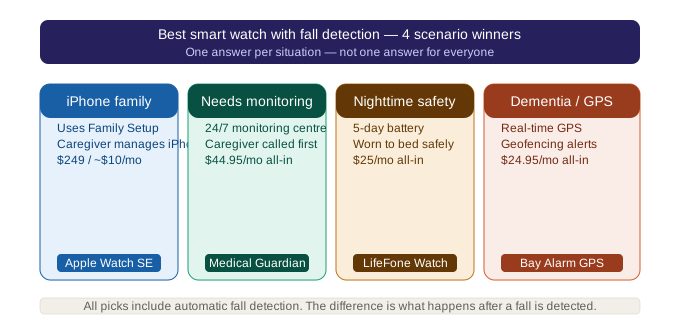
This guide on the best smart watch for seniors with fall detection works differently. It gives you four definitive picks — one for each of the most common caregiver scenarios. By the end, you will know exactly which smartwatch is best for your parent’s specific situation, what it will actually cost over three years, and how to get your parent to wear it.
What Makes a Smartwatch the “Best” for a Senior? — Best Smart Watch For Seniors With Fall Detection
The standard review criteria — fall detection accuracy, battery life, GPS precision, monthly cost, ease of use — all matter. But they matter in different proportions for different parents. Caregivers evaluating best smart watch for seniors with fall detection will find the key details in this section.
For a solo senior with no smartphone: the best smart watch for seniors with fall detection must operate independently — no phone required — and connect to a professional monitoring centre when something goes wrong.
For a tech-comfortable senior in an iPhone household: cost and seamless setup matter most.
For a senior with nighttime fall risk: battery life is the deciding factor.
For a stubborn parent who refuses anything medical-looking: the best smart watch for seniors with fall detection is the one they will actually wear — acceptance and form factor are the primary criteria, because a watch that does not get worn protects no one.
The framework below maps each scenario to a specific pick. Find your scenario and read that section.
Two Fundamentally Different Categories
Before comparing specific picks, it helps to understand that “smartwatch with fall detection” actually spans two different kinds of device. Medical alert smartwatches (Medical Guardian MGMove, Lively Wearable2) are purpose-built emergency devices: built-in cellular, no phone required, and every alert routes to a professional 24/7 monitoring centre that screens the situation before deciding whether to dispatch help. Consumer smartwatches (Apple Watch SE, Samsung Galaxy Watch) are general-purpose devices with fall detection as one feature among many, when triggered, they call 911 directly, with no professional screening and no monitoring subscription. Neither category is universally better, a solo senior with no smartphone needs the first; an iPhone household that’s always reachable can often get by on the second. The four picks below map each category to the scenario it fits best.
Best for Maximum Safety — Medical Guardian MGMove ($47.95/mo)
Medical Guardian Caregivers evaluating best smart watch for seniors with fall detection will find the key details in this section.
Scenario: Parent lives alone. No smartphone. Needs professional emergency response. Family is not always immediately reachable.
Medical Guardian MGMove is the best smart watch for seniors with fall detection at the maximum safety tier — the only device in this guide that combines professional monitoring, independent cellular (no phone required), GPS tracking, and auto-fall detection in one subscription.
When the button is pressed or fall detection triggers, the call routes to a CSAA Five Diamond certified monitoring centre. A trained operator speaks with your parent through the watch’s two-way speaker, assesses the situation, and responds appropriately — without dispatching an ambulance for every false alarm.
The watch looks like a GPS sports watch. It does not look like a medical device. There is no pendant stigma.
Monthly: $47.95 (all-inclusive — monitoring, GPS, cellular, fall detection)
Device: $0
Battery: ~24 hours — charge during day, wear overnight
Year 3 total: $1,726.20
Contract: Month-to-month
Honest limitation: Medical Guardian MGMove is the most expensive best smart watch for seniors with fall detection in this guide. At $47.95/mo it is $396/year more than Lively and $456/year more than Apple Watch. The premium is justified for high-risk solo seniors. For lower-risk seniors with reachable family, it may not be.
When to choose Medical Guardian MGMove:
- Parent lives alone in a rural area or an area where emergency response times are long
- Parent has no smartphone and cannot manage technology-dependent setup
- Dementia with GPS wandering risk
- Family lives more than 30 minutes away and cannot be the primary first responder
Best for Budget — Apple Watch SE ($249 + $10/mo)
Apple Watch Caregivers evaluating best smart watch for seniors with fall detection will find the key details in this section.
Scenario: iPhone household. Tech-comfortable senior. Family is always reachable. Budget is a meaningful factor.
Apple Watch SE is the best value smartwatch for fall detection in 2026 at $609 total over three years — $1,117 less than Medical Guardian MGMove.
Family Setup is the feature that makes Apple Watch the best smart watch for seniors with fall detection managed entirely from a caregiver’s iPhone — you configure and manage the watch without your parent needing a phone of their own. Emergency contacts, fall detection settings, and GPS location via Find My are all managed remotely by the caregiver.
When fall detection triggers on the best smart watch for seniors with fall detection and your parent does not respond within 10 seconds, the watch calls 911 and sends a location text to all emergency contacts simultaneously.
Device: $249
Monthly: $10 (cellular add-on to existing family plan)
Battery: ~18 hours — charge nightly
Year 3 total: $609
Professional monitoring: No
Three trade-offs to accept before choosing Apple Watch:
- 911 only — no professional monitoring screens the fall. Every detected fall triggers emergency services.
- Nightly charging required — 18-hour battery means your parent is uncovered from approximately 10pm to 6am unless they charge during the day.
- iPhone household required — Family Setup works only with iPhone. Android families cannot use this approach.
When to choose Apple Watch SE:
- iPhone household with at least one person always reachable
- Tech-comfortable senior or one managed remotely by a tech-savvy caregiver
- Lower to moderate fall risk where 911 auto-dispatch is acceptable
- Budget is a primary consideration
Best for Battery and Simplicity — Lively Wearable2 ($149 + $14.99/mo)
Scenario: Non-tech senior. Nighttime fall risk. Parent cannot manage daily charging. Wants professional monitoring at the lowest monthly cost.
Lively Wearable2 wins a category that no other review site creates but every caregiver eventually discovers they needed: best for the parent who forgets to charge things and gets up at 2am.
The 3–5 day battery is Lively’s defining advantage among best smart watch for seniors with fall detection options. It means your parent can wear the Lively to bed every night without any charging routine adjustment. For every other device in this guide, overnight wear requires deliberate planning — charge during a shower, charge at lunch, establish a new habit. Lively simply does not require this.
Lively is also the most accessible best smart watch for seniors with fall detection for a non-tech senior. One button. No apps to open. No smartphone to pair. Setup takes minutes and can be done by a caregiver remotely. The monitoring centre — included with the Urgent Response plan — answers every alert with a trained operator, not a 911 auto-dispatch.
Device: $99–$149
Monthly: $14.99–$24.99 (Urgent Response plan includes fall detection)
Battery: 3–5 days
GPS: Built in
Year 3 total: ~$689
Contract: Month-to-month
Honest limitation: Lively is not a consumer smartwatch — it is a dedicated best smart watch for seniors with fall detection, not a general-purpose device. No health apps, no music, no notifications beyond emergency alert and step counting. For a parent who wants watch features beyond safety, Apple Watch or Samsung are more appropriate — but neither matches Lively’s overnight coverage.
When to choose Lively Wearable2:
- Nighttime fall risk is significant (frequent bathroom trips, prior nighttime falls)
- Non-tech parent who will not engage with a complex device
- Parent forgets to charge devices — 5-day battery removes the daily compliance requirement
- Professional monitoring desired at the lowest available monthly cost
Best for Android Families — Samsung Galaxy Watch ($250 + $10/mo)
Scenario: Android household. Tech-comfortable senior. 911 response is acceptable. Budget similar to Apple Watch.
Samsung Galaxy Watch is the best smart watch for seniors with fall detection for families that use Android rather than iOS. Fall detection is built into One UI Watch. Cellular capability is available. The device is indistinguishable from a standard fitness watch.
The 2-day battery is a modest improvement over Apple Watch’s 18-hour cycle — allowing some overnight coverage with a daytime charging routine.
Device: $199–$349
Monthly: $10 (cellular add-on)
Battery: ~2 days
Year 3 total: ~$610
Professional monitoring: No — 911 only
Honest limitation: Unlike Apple Watch’s Family Setup, Samsung Galaxy Watch does not have a direct equivalent for managing a best smart watch for seniors with fall detection remotely from a different person’s phone. Setup generally requires the parent’s own involvement or the caregiver to be physically present. Integrates most smoothly with Samsung phones — other Android brands may have reduced functionality.
When to choose Samsung Galaxy Watch:
- Android and specifically Samsung household
- Family member can assist with in-person setup
- Tech-comfortable senior
- iPhone is not available for Family Setup
Two more options worth knowing about, even though they don’t top any scenario here. MobileHelp Solo ($32.95/mo, no device fee, ~$1,186 over three years) is a middle-ground medical alert watch, professional monitoring and GPS between Lively’s price and Medical Guardian’s, for caregivers who want monitoring without either extreme. Garmin Venu has incident detection but depends on a nearby phone via Bluetooth rather than standalone cellular, and carries no monthly fee, a fit only for active, low-risk seniors who always carry their phone.
Side-by-Side — All 4 Picks at a Glance
| Medical Guardian MGMove | Apple Watch SE | Lively Wearable2 | Samsung Galaxy Watch | |
|---|---|---|---|---|
| Monthly | $47.95 | $10 | $14.99–$24.99 | $10 |
| Year 3 Total | $1,726 | $609 | ~$689 | ~$610 |
| Monitoring | Professional | 911 only | Professional | 911 only |
| Battery | 24h | 18h | 3–5 days | 2 days |
| Phone Required | No | No (Family Setup) | No | Yes (Samsung) |
| Best For | Solo senior, max safety | iPhone family, budget | Nighttime, simplicity | Android family |
The 3-Year Cost Reality — $609 vs $689 vs $1,726
The most important financial comparison in this guide is between the three options that provide meaningful fall detection with professional monitoring or cellular connectivity:
Apple Watch SE: $609 — no professional monitoring, 911 only, nightly charge
Lively Wearable2: ~$689 — professional monitoring, 5-day battery, simplest interface
Medical Guardian MGMove: $1,726 — professional monitoring, GPS without phone, CSAA certified centre
The $80 difference between Apple Watch and Lively over three years is the smallest decision in this guide. For most non-iPhone families or families who want professional monitoring, Lively’s $80 premium over three years is clearly justified.
The $1,117 difference between Apple Watch and Medical Guardian is the largest. That premium pays for a professional operator who screens every fall, GPS without a connected phone, and no false alarm 911 calls. For a solo senior at high risk, it is justified. For a lower-risk senior with family nearby, it may not be.
Which Watch for Dementia — by Stage
This is the section no competitor provides. Fall detection smartwatch suitability varies significantly by dementia stage.
Mild dementia: Apple Watch SE with Family Setup. Caregiver manages all settings, contacts, and location monitoring remotely. Simple daily wear. No apps for the senior to manage. GPS location visible to caregiver at all times via Find My.
Moderate dementia with wandering risk: Medical Guardian MGMove. GPS tracking is the primary benefit — emergency services can be dispatched to a current GPS location rather than a fixed home address. The monitoring centre calls the caregiver when any alert triggers, allowing human assessment before emergency services are sent.
Moderate dementia without wandering risk: Lively Wearable2. Simplest interface, longest battery, professional monitoring. Requires no daily charging compliance — the most common failure point for dementia caregivers.
Advanced dementia (compliance unreliable): No smartwatch is appropriate. A room-based fall detection sensor (Vayyar Care) detects falls using radar without requiring anything to be worn. This is the only reliable category for seniors who actively remove wearables.
For a full comparison of pendant, watch, and room-sensor options mapped to exactly why fall alert devices fail, not worn, not pressed, or out of range, see our guide to fall alert devices for seniors.
The Best Watch for a Stubborn Parent
The “best” watch is the one your parent actually wears. This section maps each pick to stubborn parent scenarios.
Parent who says the watch looks medical: Apple Watch SE — indistinguishable from any fitness smartwatch. Medical Guardian MGMove — looks like a GPS sports watch, not a medical device.
Parent who says they don’t need anything: “Dad, this one counts your steps and you can call me from your wrist.” The step tracking is the entry point — the fall detection is the quiet backstory.
Parent who says they already have a watch: “This one also does your heart rate and you can check weather on it. Give it a week.” Position as an upgrade, not a replacement for safety.
Parent who is concerned about privacy: Medical Guardian MGMove and Lively share location only with designated contacts and the monitoring centre — not broadly. Explain exactly who can see location and under what circumstances.
30-day trial as the unlock: “Try it for a month. If you hate it, we’ll send it back.” No device in this guide requires a contract. A genuine trial offer removes the permanence that triggers the most resistance.
Frequently Asked Questions
Q: What makes a smartwatch the best for a senior with fall detection?
A: The best smartwatch is the one that matches your parent’s specific situation — not the one that scores highest on a generic comparison. For solo seniors: professional monitoring and independent cellular (Medical Guardian MGMove). For iPhone families: lowest cost and Family Setup (Apple Watch SE). For nighttime risk: longest battery (Lively Wearable2). For Android: Samsung Galaxy Watch.
Q: Is the Apple Watch the best smartwatch for fall detection for seniors?
A: For iPhone families on a budget, yes. For seniors living alone without a smartphone or family nearby: no — Medical Guardian MGMove’s professional monitoring centre is more appropriate than Apple Watch’s automatic 911 response.
Q: What is the difference between a medical alert watch and a smartwatch?
A: A medical alert watch (Medical Guardian MGMove, Lively Wearable2) connects to a professional monitoring centre when an alert triggers. A consumer smartwatch (Apple Watch, Samsung Galaxy Watch) calls 911 directly with no professional screening. Medical alert watches operate independently of a smartphone. Consumer smartwatches require phone pairing or plan management for full functionality.
Q: Do I need a monthly subscription for a smartwatch with fall detection?
A: Medical alert smartwatches (Medical Guardian MGMove, Lively) require a monitoring subscription ($14.99–$47.95/mo). Consumer smartwatches (Apple Watch, Samsung) require a $10/mo cellular plan add-on only.
Q: Which is easiest to use for a senior?
A: Lively Wearable2 — one emergency button, no apps, no smartphone pairing required. Designed specifically for seniors with limited tech experience.
Q: What is the best smartwatch for a senior with dementia who wanders?
A: Medical Guardian MGMove. GPS tracking allows emergency services to be dispatched to a current GPS location rather than a fixed home address. The professional monitoring centre calls the caregiver when any alert triggers. For advanced dementia where compliance is unreliable, a room sensor is more appropriate than any smartwatch.
Q: What is the best smartwatch for fall detection that can be worn overnight with no charging needed?
A: Lively Wearable2 — 3 to 5 day battery allows consistent overnight wear without any daily charging routine. Every other device in this guide requires daily or every-other-day charging.
Q: Apple Watch vs Medical Guardian MGMove — which is actually better for an elderly parent?
A: Depends on the parent. Apple Watch ($609/3yr) is better for iPhone families who are always reachable and comfortable with 911 auto-response. Medical Guardian MGMove ($1,726/3yr) is better for solo seniors who need professional monitoring that screens falls before dispatching emergency services. The $1,117 difference over three years pays for that professional screening capability.
Q: What is the total cost of the best fall detection smartwatch over 3 years?
A: Apple Watch SE: $609. Samsung Galaxy Watch: ~$610. Lively Wearable2: ~$689. Medical Guardian MGMove: $1,726. See the full comparison table above.
Q: What is the best smartwatch for a parent who refuses to wear any device?
A: Start with the form factor that has the least medical stigma. Apple Watch SE looks identical to a consumer fitness watch. Medical Guardian MGMove looks like a GPS sports watch. Introduce it as a watch with useful features — step tracking, time, weather — not as a safety device. Agree to a 30-day trial. If the parent continues to refuse all wearables, a room-based sensor (Vayyar Care) detects falls without requiring anything to be worn.
Our Final Recommendation
For maximum safety (solo senior, no smartphone): Medical Guardian MGMove. Professional monitoring, GPS, no phone required. Medical Guardian
For best value (iPhone household, always reachable): Apple Watch SE at $609 over three years. Apple Watch
For nighttime protection and simplicity: Lively Wearable2. Only watch that can be worn to bed every night. Lively
For Android households: Samsung Galaxy Watch. Samsung Galaxy Watch
Before purchasing: call your parent’s Medicare Advantage plan and ask specifically about PERS device coverage. Some plans include medical alert devices at no additional cost to the member.
For a complete step-by-step setup guide covering Apple Watch fall detection, see our Apple Watch for seniors with fall detection guide.
If you want the broader picture beyond watches, including pendants and base-station systems, see our guide to medical alert systems for seniors with fall detection.