She paid $48 a month for fourteen months.
In This Guide
- Overview
- Comparison
- Best Options
- Our Recommendation
In that time, the monitoring centre called her exactly once — a false alarm, her mother bumping against the kitchen counter. The pendant worked fine. The monitoring centre was fast and professional. The technology was exactly as advertised.
And then she found the pendant in the nightstand drawer.
Not because her mother had fallen. Because her mother had decided at some point — she could not remember exactly when — that she would not be wearing “that thing” to bed. It was uncomfortable. It tangled. She was fine.
Fourteen months of protection. Seven of them real.
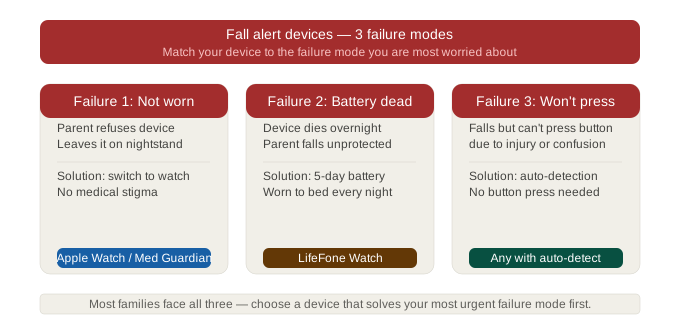
A fall alert device only works under three conditions simultaneously: your parent is wearing it, it has power, and either they press the button or the auto-detection fires. Every failure mode in this category traces back to one of those three conditions failing at the critical moment.
This guide to fall alert devices for seniors tells you which devices actually protect against each failure mode — and which ones leave a quiet gap you may not discover until it matters.
The Three Ways Fall Alert Devices Fail (And Which Devices Solve Each) — Fall Alert Device For Seniors
Before comparing products, you need to understand the failure modes. This is the framework no competitor site provides — and the reason so many caregivers end up with a device that technically works but practically doesn’t. Caregivers evaluating fall alert device for seniors will find the key details in this section.
Failure Mode 1: Not Worn
The most common failure. The pendant sits in the drawer. The watch is on the charger. The device is not on the body.
Solution: longer battery (Lively Wearable2 — 5 days, can sleep in it), room-based sensor that requires no wearable at all (Vayyar Care), or watch form factor that is more acceptable than pendant (Medical Guardian MGMove, Apple Watch).
Failure Mode 2: Not Pressed
The senior falls and is unable to press the button — unconscious, confused, or dazed. The device is being worn but no alert fires.
Solution: auto-fall detection. Devices that detect the fall signature automatically, without requiring any action from the senior. Medical Guardian MGMini, Bay Alarm Medical with fall detection add-on, Lively Wearable2, and Apple Watch all include this.
Failure Mode 3: Out of Range or No Power
The device is worn and functional but cannot communicate — base station out of range, cellular signal lost, or battery depleted.
Solution: cellular-enabled devices (no base station range limit), long battery life, and low-battery alerts to caregivers.
Every device in this guide solves some of these failure modes. None solves all three perfectly. Understanding which failure modes apply to your parent determines which device is right.
Types of Fall Alert Devices — Pendant, Watch, Room Sensor
Most caregivers start their research thinking “fall alert” means one thing. It means three fundamentally different things, each suited to different situations. Caregivers evaluating fall alert device for seniors will find the key details in this section.
Pendant (wearable around neck): Most common. Works well when the senior wears it consistently. Highest failure rate due to non-compliance. Auto-fall detection available on most modern pendants.
Watch (wearable on wrist): Higher acceptance rate than pendant. Same compliance requirements — must be worn and charged. GPS models follow the senior outside the home.
Room sensor (no wearable): Radar or infrared-based sensors installed in key rooms detect falls without requiring anything to be worn. The only category that eliminates the compliance failure mode entirely. Higher equipment cost but zero daily compliance requirement.
Which type you need depends on which failure mode is most relevant for your parent.
Best All-Round Fall Alert Device — Medical Guardian MGMini ($47.95/mo)
Medical Guardian’s MGMini pendant is the consensus strongest fall alert device for seniors at moderate to high fall risk who will wear the device consistently.
When fall detection triggers — automatically or via manual button press — the alert routes to a CSAA Five Diamond certified monitoring centre. A trained operator attempts to speak with your parent, assesses the situation, and dispatches the most appropriate response. Not 911 for every alert. A professional judgment call, every time.
The pendant is cellular-enabled — no base station range limit. Your parent is covered in the garden, the car park, the shops. Fall detection works wherever they are.
The specific failure mode it does not solve: the device must be worn. If your parent removes it — for sleep, for a shower they never return from, for personal resistance — it provides no protection.
Monthly: $47.95 (all-inclusive)
Device: $0
Battery: ~24 hours — must be charged daily
GPS: Built in
Year 3 total: $1,726.20
Contract: Month-to-month
Best Value Fall Alert Device — Bay Alarm Medical ($37.95/mo)
Bay Alarm Medical offers professional monitoring with auto-fall detection at the lowest monthly cost in the pendant category.
The in-home base station covers 1,000 feet — the widest range among affordable providers — which means the pendant communicates reliably across large homes, two-storey layouts, and properties where the base station cannot be centrally located.
The $10/mo fall detection add-on is in line with the category standard. Total cost with fall detection: $37.95/mo.
Monthly: $27.95 base + $10 fall detection = $37.95
Device: $0
GPS: Available on SOS GPS+ plan ($37.95/mo, fall detection included)
In-home range: 1,000 ft
Year 3 total: $1,366.20 (in-home with fall detection)
Contract: Month-to-month
Same failure mode as Medical Guardian: must be worn. Same compliance dependency. For seniors who will wear the pendant consistently, Bay Alarm delivers equivalent safety at $360 less over three years.
Best for Nighttime — Lively Wearable2 ($149 + $14.99/mo)
Lively Wearable2 addresses failure mode 1 — the “not worn at night” problem — better than any other device in this guide.
Its 3–5 day battery allows your parent to wear it to bed every night. No nightly charging routine. No gap in coverage during the midnight to 6am hours when most serious falls occur.
Professional monitoring is included on the Urgent Response plan. When the button is pressed or fall detection triggers, a trained operator responds — not an automatic 911 dispatch.
Device: $99–$149
Monthly: $14.99–$24.99 (Urgent Response plan)
Battery: 3–5 days
GPS: Built in
Year 3 total: ~$689
Contract: Month-to-month
The specific failure mode Lively solves: overnight non-wear due to charging. The failure mode it does not solve: a parent who removes it during the day, or who has advanced dementia and cannot manage any wearable consistently.
Best for No-Wear Required — Vayyar Care ($299 + $49/mo)
Vayyar Care is in a different category from every other device in this guide — and it is the only device that eliminates the compliance failure mode entirely.
Vayyar uses radar technology (similar to the sensors used in automotive safety systems) to detect falls in a room without requiring anything to be worn, pressed, or charged by the senior. The sensor is mounted on the wall and monitors movement patterns passively. When it detects a fall, it alerts caregivers or the monitoring centre automatically.
For a parent who refuses all wearables, removes devices, has advanced dementia, or who caregivers have never been able to get into a pendant or watch — Vayyar is the only technology that provides fall alert coverage regardless of compliance.
Device: $299 (sensor — typically 1–3 needed per home)
Monthly: $49
Year 3 total: ~$2,063 (single sensor)
Coverage: Room-specific — one sensor per key room (bedroom, bathroom, living room)
Honest limitations: The highest cost option. Coverage is room-specific — a fall in an uncovered room is not detected. Privacy considerations apply — the sensor monitors movement patterns continuously. Some families and seniors are uncomfortable with this.
When Vayyar is the right choice:
- Parent actively refuses all wearables
- Advanced dementia where no compliance can be expected
- Parent has fallen previously without pressing the button
- Room-specific monitoring is sufficient for the layout (bedroom + bathroom typically cover 80% of fall risk locations)
The Nighttime Gap — Why Most Fall Alert Devices Fail at 2am
This is the most underreported failure pattern in the entire senior safety category.
The scenario: Your parent wakes at 2am needing the bathroom. They are disoriented from sleep. The hallway is dark. They are not wearing their fall alert device because it was uncomfortable to sleep in, or because the battery was low and they put it on the charger, or simply because they took it off before bed and forgot to put it back on.
They fall in the hallway. Nobody knows.
This specific scenario — the nighttime bathroom fall with no device — is the most common serious undetected fall situation in the category. Here is how each device type addresses it:
Standard pendant (Medical Guardian, Bay Alarm): Fails if not worn to bed. Must establish a specific “charge during the day, wear at night” routine. Many seniors do not maintain this consistently.
Medical Guardian MGMove watch (24h battery): Can be worn overnight if charged during a daytime window (shower, lunch). Requires a habit change.
Lively Wearable2 watch (5-day battery): No habit change required. Worn to bed every night. Best nighttime coverage of any wearable device.
Vayyar room sensor: Covers the bedroom and hallway continuously, regardless of what the senior is or is not wearing. Best nighttime coverage overall — zero compliance dependency.
Dementia and Fall Alert Devices — Only Two Options That Work
For a parent with moderate to advanced dementia, the standard fall alert device category effectively reduces to two options.
Option 1: Lively Wearable2. Simple interface, long battery, professional monitoring. Requires minimal daily compliance — charge once every 3–5 days. For mild to moderate dementia, this is the strongest wearable option.
Option 2: Vayyar Care room sensor. Requires nothing from the senior. No wearable, no charging, no button. The radar monitors the room continuously. For moderate to advanced dementia where wearable compliance cannot be relied upon, Vayyar is the only device that provides reliable fall alert coverage.
Standard pendants and consumer smartwatches both fail for dementia when the senior is unable to maintain wearing and charging routines — which is often the case in moderate to advanced stages.
Cost Over 3 Years — Match Budget to Risk Level

| Device | Year 3 Total | Monitoring | Failure Mode Solved |
|---|---|---|---|
| Bay Alarm Medical (pendant + fall detection) | $1,114 | Professional | Auto-detect (not worn) |
| Lively Wearable2 | ~$689 | Professional | Overnight non-wear |
| Medical Guardian MGMini | $1,726 | Professional | Auto-detect |
| Vayyar Care (1 sensor) | ~$2,063 | Via sensor | All compliance failures |
The apparent anomaly: Vayyar is the most expensive and Lively is the cheapest among options with professional monitoring — yet Vayyar solves the most failure modes. The cost premium for Vayyar is the cost of compliance-free protection.
For most seniors at moderate risk who will wear a device consistently: Bay Alarm Medical or Lively provides the best value.
For seniors whose compliance cannot be relied upon: Vayyar’s higher cost is justified by the coverage it provides in compliance-failure scenarios.
Insurance, FSA/HSA, and Medicare Advantage
FSA/HSA: Fall alert devices — including pendant medical alerts and medical alert watches — are generally eligible as qualified medical expenses. The device purchase cost can be paid with FSA or HSA funds. Monthly monitoring fees are typically not FSA/HSA eligible.
Medicare Advantage: Some plans include personal emergency response system (PERS) coverage as a supplemental benefit. Call your parent’s plan and ask specifically: “Does my plan cover fall alert devices or personal emergency response systems?” Ask twice — the first answer is sometimes incomplete.
Medicaid HCBS waivers: Some state Medicaid programmes fund PERS devices for qualifying low-income seniors under Home and Community-Based Services waivers. Contact your state Medicaid office or the Eldercare Locator (1-800-677-1116) for local programme information.
Frequently Asked Questions
Q: What is a fall alert device for seniors?
A: A fall alert device detects when a senior falls and automatically notifies emergency contacts or a monitoring centre. Modern devices use accelerometers (wearables) or radar (room sensors) to detect falls without requiring the senior to press a button. Response can go to a professional monitoring centre, to 911, or to preset caregiver contacts.
Q: Is there a fall alert device that works automatically?
A: Yes. Auto-fall detection is built into Medical Guardian, Bay Alarm Medical (with add-on), Lively Wearable2, Apple Watch, and Samsung Galaxy Watch. Room sensors (Vayyar Care) detect falls continuously without any wearable or button. All of these trigger alerts without requiring the senior to take any action.
Q: Are there fall alert devices that don’t require wearing anything?
A: Yes — Vayyar Care uses radar to detect falls without any wearable. It is mounted on the wall and monitors room movement passively. Coverage is room-specific. It is the only category that eliminates the wearable compliance failure mode entirely.
Q: What is the difference between a fall alert and a fall detection device?
A: The terms are used interchangeably. Both refer to devices that detect a fall (via accelerometer, gyroscope, or radar) and trigger an alert. “Fall detection” typically emphasises the auto-detection capability. “Fall alert” typically emphasises the notification sent to caregivers or emergency services.
Q: What happens when a fall alert device is triggered?
A: Depends on the device type. Medical alert devices (Medical Guardian, Bay Alarm, Lively): alert goes to a professional monitoring centre. Operator speaks with the senior, assesses the situation, and dispatches the appropriate response. Consumer devices (Apple Watch, Samsung): calls 911 and texts emergency contacts. Room sensors (Vayyar): sends alert to designated caregivers and/or monitoring service.
Q: Does the Medical Guardian fall alert device work outdoors?
A: Yes. Medical Guardian’s cellular-enabled devices (MGMini pendant and Active watch) work outdoors independently of any base station or Wi-Fi. GPS is built in for location tracking anywhere.
Q: What happens if my mum falls but doesn’t press the button — will the fall alert device still work?
A: Yes, if the device has auto-fall detection enabled. Medical Guardian, Bay Alarm Medical (with fall detection add-on), Lively Wearable2, Apple Watch, and Samsung Galaxy Watch all detect falls automatically without requiring the senior to press the button. Room sensors (Vayyar) detect falls via radar without any wearable or button at all.
Q: My dad has dementia and takes off any device — is there a fall alert he can’t remove?
A: Vayyar Care room sensor is the closest available solution. It requires nothing to be worn and cannot be removed by the senior — the sensor is wall-mounted and operates passively. For moderate dementia where wearable compliance is partial, Lively Wearable2’s simple interface and long battery reduce the daily compliance burden significantly.
Q: Which fall alert device works at night when my mum gets up to use the bathroom?
A: Lively Wearable2 (5-day battery — worn to bed every night) or Vayyar Care room sensor (no wearable required). Standard pendants and most watches require nightly charging — leaving the senior unprotected during the highest-risk fall hours without a deliberate daytime charging routine.
Q: Does the monitoring centre call me or 911 when a fall alert is triggered?
A: Professional monitoring devices (Medical Guardian, Bay Alarm, Lively): a trained operator calls you and assesses the situation before deciding whether to dispatch emergency services. Consumer devices (Apple Watch, Samsung Galaxy Watch): 911 is called automatically, and a text goes to your emergency contacts simultaneously. The monitoring centre approach avoids ambulance dispatch for false alarms.
Q: I bought a fall alert device but my dad won’t wear it — what can I do?
A: First, change the form factor — if he rejected a pendant, try a watch (Medical Guardian MGMove, Lively). If he rejects all wearables, Vayyar Care room sensor requires nothing to be worn. If the issue is appearance, Apple Watch SE looks identical to a consumer fitness watch. If the issue is identity resistance, frame it as a communication device rather than a safety device. Agree to a 30-day trial — all major providers are month-to-month.
Our Final Recommendation
For most seniors who will wear a device consistently: Medical Guardian MGMini is the strongest all-round fall alert device — professional monitoring, GPS, auto-fall detection, and no range limit. Medical Guardian
For the best value with professional monitoring: Bay Alarm Medical at $37.95/mo (with fall detection add-on) saves $360 over three years versus Medical Guardian with equivalent monitoring quality for most home situations. Bay Alarm Medical
For nighttime protection — the most commonly overlooked failure mode: Lively Wearable2. The only wearable device your parent can wear to bed every night without a charging routine change. Lively
For seniors who will not wear any device: Vayyar Care room sensor. Zero compliance required. Vayyar Care
Before purchasing anything — check your parent’s Medicare Advantage plan for PERS coverage and confirm whether your FSA or HSA can cover the device cost.
For a broader comparison across every medical alert system format, see our guide to medical alert systems for seniors with fall detection. For smartwatch-format options specifically, see our guide to the best smart watch for seniors with fall detection. If a simple, no-frills button is what your parent actually needs, see our guide to emergency buttons for seniors.