His family already had four iPhones between them.
In This Guide
- Overview
- Comparison
- Best Options
- Our Recommendation
When his father needed fall detection, the Apple Watch SE seemed like the obvious answer. Same ecosystem. Simple setup. And at $609 over three years — $1,117 less than the medical alert watch he had been considering — the savings were hard to ignore. For further reading, see Apple Watch fall detection guide.
He bought it. Set it up. His father wore it happily because it looked like every watch his neighbours wore.
Three weeks later, his father fell at 2am on the way to the bathroom. The watch was on the charging cable on the nightstand.
The fall was minor — his father got himself up. But it was a lesson about Apple Watch fall detection that nobody had explained before the purchase: the 18-hour battery means nightly charging, and nightly charging means no overnight protection unless a specific routine is established.
This guide tells you everything about Apple Watch for seniors with fall detection — what it does brilliantly, what its honest limitations are, and how to set it up correctly — so you can make the right decision before you buy.
Does Apple Watch Have Fall Detection? — Apple Watch For Seniors With Fall Detection
Yes. All Apple Watch models from Series 4 onward — including the SE — have built-in fall detection. It is enabled automatically for users whose age in Apple Health is set to 55 or older. Caregivers evaluating apple watch for seniors with fall detection will find the key details in this section.
Fall detection uses the watch’s accelerometer and gyroscope to identify the movement signature of a fall: rapid downward acceleration followed by sudden impact. When this pattern is detected, the watch begins a response sequence.
Which models have fall detection:
- Apple Watch SE (GPS and GPS+Cellular) — yes
- Apple Watch Series 8, 9, 10 — yes
- Apple Watch Ultra — yes
- Apple Watch Series 3 or earlier — no
For most seniors, the Apple Watch SE GPS+Cellular is the right model. It costs less than the Series 10, has all the fall detection capabilities of higher-end models, and the cellular feature means it can call for help without a phone nearby.
Why Apple Watch for Fall Detection — The Three Genuine Advantages
Before discussing trade-offs, it is worth being clear about what Apple Watch does genuinely well in this context. Caregivers evaluating apple watch for seniors with fall detection will find the key details in this section.
Advantage 1 — It does not look like a medical device
This is the most practically important advantage. A parent who has refused a pendant, rejected a medical alert watch, or insisted they “don’t need one of those things” may happily accept an Apple Watch — because it looks like the watches millions of people wear for fitness tracking. The fall detection is invisible. Nobody at the bowling club knows. Caregivers evaluating apple watch for seniors with fall detection will find the key details in this section.
Advantage 2 — Family Setup makes the parent’s phone unnecessary
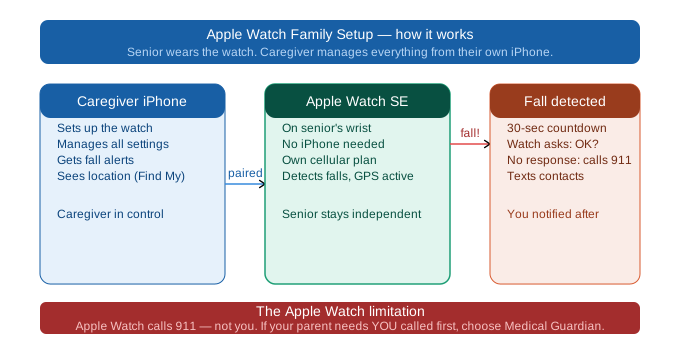
Apple Watch can be paired to a caregiver’s iPhone rather than the parent’s phone. You configure emergency contacts, enable fall detection, set up GPS location sharing, and manage the watch entirely from your own device. Your parent simply wears the watch — no phone, no apps, no tech knowledge required.
Advantage 3 — Lowest three-year cost in the fall detection category
Apple Watch SE GPS+Cellular: $249 device + $10/mo cellular = $609 over three years. This is $80 less than Lively Wearable2 and $1,117 less than Medical Guardian Active. For families where someone is always reachable and 911 response is acceptable, this cost difference is significant.
The Three Trade-Offs You Must Understand Before Choosing Apple Watch
These are not dealbreakers for every family — but they are facts that change the decision for some.
Trade-off 1: No professional monitoring centre. 911 only.
When Apple Watch detects a fall and your parent does not respond within 10 seconds, it calls 911. Not a monitoring centre operator who screens the situation. Not you first. 911.
This means:
- Every detected fall — including false alarms — generates a 911 response
- If your parent drops the watch, sits down hard, or exercises vigorously and fall detection triggers, an ambulance may be dispatched
- There is no professional operator who can speak with your parent first and assess whether emergency services are actually needed
For a senior whose family is always reachable and where occasional false alarm 911 calls are acceptable: this may not be a problem.
For a senior living alone in a rural area, or whose fall risk makes false alarms frequent: a professional monitoring centre (Medical Guardian Active, Lively Wearable2) is more appropriate.
Trade-off 2: 18-hour battery means nightly charging — no overnight protection
The Apple Watch SE has approximately 18 hours of battery life. In practice, it needs to be charged every night.
The highest-risk time for senior falls is midnight to 6am — during bathroom trips taken in low light, from a position of sleep disorientation. If the watch is charging during these hours, it cannot protect against the most common serious fall scenario.
This can be managed with a deliberate routine: charge the watch for 1–2 hours during a daytime window (shower, lunch, afternoon nap), then wear it from evening through to the following morning. But this requires establishing a new habit — and the consistency of that habit determines whether your parent is covered at 2am.
If nighttime protection without habit change is the priority, Lively Wearable2 (3–5 day battery, wear to bed every night) is the stronger choice.
Trade-off 3: False alarm 911 calls
Apple Watch fall detection is not perfect. It generates false alarms — typically around 15–25% of activations — from vigorous exercise, sitting down heavily, or accidentally dropping the watch. When these false alarms occur, the watch calls 911 after the countdown.
For most families this is a manageable inconvenience. For seniors who are very physically active, or who live in areas where repeated false alarm calls to emergency services cause friction, this is worth factoring in.
Which Apple Watch Model for Seniors?
For most seniors: Apple Watch SE GPS+Cellular ($249)
The SE has all the fall detection features of higher-end models at the lowest price. The cellular model is essential — without cellular, the watch cannot call for help when a phone is not nearby. The SE is the correct starting point for 90% of senior fall detection use cases.
For seniors who want a larger screen: Apple Watch Series 10 ($429)
Larger display, thinner profile, slightly longer battery life. Better for seniors with vision concerns who find the SE screen difficult to read.
For very active or outdoors-oriented seniors: Apple Watch Ultra ($799)
36-hour battery (the only Apple Watch that can cover overnight without any adjustment), extreme durability, and GPS accuracy. Significant overkill for most seniors — but the battery life alone justifies it for families where overnight coverage without a habit change is the priority, and Apple Watch is the preferred platform.
Family Setup — How Your Parent Uses Apple Watch Without an iPhone
Family Setup is the feature that makes Apple Watch viable for seniors who do not own an iPhone.
Here is how it works:
- You — the caregiver — open the Watch app on your own iPhone.
- Select “Set Up for a Family Member.”
- Pair the Apple Watch to your iPhone, not your parent’s phone.
- Add your parent’s emergency contacts.
- Enable fall detection (goes to Settings → Emergency SOS → Fall Detection → On).
- Set up Medical ID with your parent’s health information.
- Enable Share Location to allow GPS tracking via Find My.
Your parent receives the watch. It connects to a cellular plan — either added to your existing family plan ($10/mo) or as a standalone plan. Your parent simply wears it.
When fall detection triggers or your parent presses the side button, the watch calls 911 and texts all emergency contacts simultaneously with a GPS location.
You can check your parent’s location at any time via Find My on your own phone. If the watch detects a fall and your emergency contact number is in the list, you receive a text within seconds.
How to Set Up Fall Detection on Apple Watch
- Open the Watch app on the paired iPhone (yours, under Family Setup).
- Tap your parent’s watch at the top of the My Watches list.
- Go to Emergency SOS.
- Enable Fall Detection.
- Go to Health → Medical ID → Edit — add medical conditions, medications, blood type, and emergency contacts.
- Go to Settings → Privacy → Location Services → Share My Location — ensure sharing is on.
- Test by pressing and holding the side button to confirm the SOS contact list is correct.
Fall detection is now active. The watch will detect falls automatically and begin the response sequence (10-second countdown → 911 call + text to contacts) if your parent does not respond.
What Happens When Fall Detection Activates
- The watch detects a fall signature.
- The watch taps your parent’s wrist (haptic alert) and plays an audible sound.
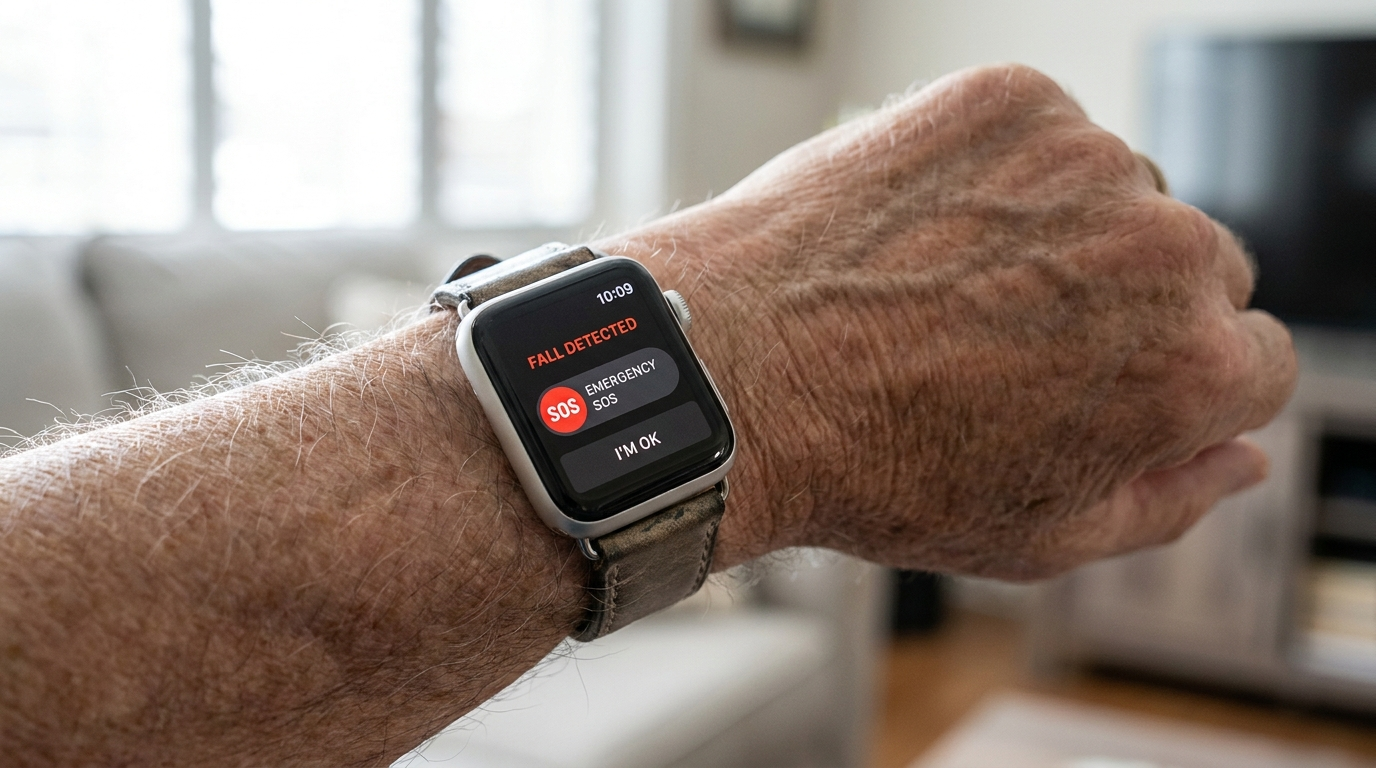
- A screen appears: “It looks like you’ve taken a fall.” Two buttons: “Emergency SOS” and “I’m OK.”
- 10-second countdown begins.
- If your parent taps “I’m OK”: no further action. Alert cancelled.
- If your parent taps “Emergency SOS”: immediately calls 911.
- If your parent does not respond (unconscious, dazed, unable to interact): countdown completes → watch automatically calls 911 and sends a text with GPS location to all emergency contacts.
- The watch stays on the call, playing audio through the speaker, while 911 is connected.
Your emergency contact text reads approximately: “[Name]’s Apple Watch detected a hard fall. Emergency SOS was called. Location: [GPS coordinates and map link].”
When Apple Watch Is Not Enough
Apple Watch is a strong fall detection device for the right family situation. It is not the right device for every situation.
Consider an alternative when:
Your parent lives alone with no family nearby. A professional monitoring centre that can speak with your parent, screen the situation, and dispatch appropriate help is significantly safer than an automatic 911 call.
Your parent has dementia and may not respond to the countdown prompt. Without a response, the watch calls 911. This may be acceptable — but for wandering risk, Medical Guardian Active’s GPS tracking and monitoring centre notification is more comprehensive.
Nighttime fall risk is significant and the charging routine cannot be established. Lively Wearable2 (5-day battery, worn to bed every night) provides more reliable overnight protection without any behaviour change.
Your parent falls frequently, generating repeated false alarm 911 calls. Medical Guardian Active or Lively with professional monitoring screens each alert before dispatching emergency services.
For nighttime supplementation: pairing Apple Watch (daytime) with a room sensor (Vayyar Care) for the bedroom covers the overnight charging gap without replacing the watch. Vayyar Care
Apple Watch vs Medical Alert Watches — When to Choose Each
| Apple Watch SE | Medical Guardian Active | Lively Wearable2 | |
|---|---|---|---|
| Year 3 cost | $609 | $1,726 | ~$689 |
| Monitoring | 911 only | Professional | Professional |
| Battery | 18h | 24h | 3–5 days |
| Phone required | No (Family Setup) | No | No |
| Overnight coverage | With routine | With routine | Every night |
| False alarm response | 911 dispatched | Screened | Screened |
Choose Apple Watch when: iPhone household, always reachable family, budget is a factor, moderate fall risk, 911 auto-response is acceptable.
Choose Medical Guardian Active when: solo senior, no smartphone, high fall risk, professional monitoring required, dementia with wandering risk.
Choose Lively Wearable2 when: non-tech senior, nighttime fall risk, professional monitoring at lowest monthly cost, parent forgets to charge devices.
FSA/HSA and Insurance for Apple Watch
Apple Watch falls in a grey area for FSA/HSA eligibility. The device is a consumer product, not a medical device. However:
If a physician prescribes or specifically recommends an Apple Watch for fall risk monitoring, some FSA/HSA administrators accept the claim.
Some Medicare Advantage plans include fitness device benefits (SilverSneakers, Fitbit Programme equivalents) that provide partial Apple Watch cost coverage. Check your parent’s specific plan.
Standard Medicare (Parts A and B) does not cover Apple Watch.
For dedicated medical alert watches (Medical Guardian Active, Lively Wearable2), FSA/HSA eligibility for the device cost is generally clearer — these are purpose-built medical devices rather than consumer electronics.
Frequently Asked Questions
Q: Does Apple Watch have fall detection for seniors?
A: Yes. All Apple Watch models from Series 4 onward (SE, Series 8, 9, 10, Ultra) have built-in fall detection. It activates automatically for users with age 55+ set in Apple Health.
Q: Which Apple Watch models have fall detection?
A: SE, Series 8, Series 9, Series 10, and Ultra. Series 3 and earlier do not. For seniors, Apple Watch SE GPS+Cellular is the recommended model.
Q: Does Apple Watch automatically call 911 if a fall is detected?
A: After a 10-second countdown with no response from the senior, yes — Apple Watch calls 911 and sends a text with GPS location to all emergency contacts simultaneously.
Q: Do I need an iPhone for my parent to use Apple Watch fall detection?
A: No. Family Setup allows a caregiver to pair the watch to their own iPhone and manage everything remotely. The parent does not need any phone.
Q: How long does Apple Watch battery last with fall detection on?
A: Approximately 18 hours. The watch must be charged daily — typically overnight, which creates a gap in protection during the highest-risk fall hours.
Q: Can Apple Watch replace a medical alert system?
A: For iPhone households where family is always reachable and 911 auto-response is acceptable: yes, functionally. For solo seniors who need a professional monitoring centre to screen falls and speak with them through the device: a dedicated medical alert watch is more appropriate.
Q: Is Apple Watch SE good for seniors with fall detection?
A: Yes, for the right situation. It has all the fall detection features of higher-end models at the lowest cost. The limitations are the 18-hour battery and 911-only response — both of which are acceptable for many families but not all.
Q: Is the Apple Watch the best fall detection device for a parent who won’t wear a pendant?
A: It is often the most effective option for pendant-resistant parents because it looks identical to a consumer fitness watch. For tech-comfortable seniors in iPhone households: Apple Watch SE is the answer to pendant rejection. For non-tech seniors who also need professional monitoring: Medical Guardian Active or Lively Wearable2 in watch form factor.
Q: What happens at night when Apple Watch is charging and my mum falls?
A: If the watch is on the charger, it cannot detect falls. The 18-hour battery means nightly charging is standard. Mitigate this by establishing a daytime charging routine — 1 to 2 hours during a shower, lunch, or nap — so the watch can be worn from evening through to the following morning. For reliable overnight coverage without a habit change, Lively Wearable2 (5-day battery) is the stronger choice.
Q: Can Apple Watch fall detection send a text to me instead of 911?
A: When fall detection triggers and your parent does not respond, the watch calls 911 AND sends a text to all emergency contacts simultaneously. You will receive the text — but 911 is also called. There is no option to receive only a text without a 911 call.
Q: How do I set up Apple Watch fall detection for my mum who has dementia?
A: Use Family Setup to pair the watch to your own iPhone. Enable fall detection in Emergency SOS settings. Add yourself as the primary emergency contact. Enable Share Location via Find My for GPS tracking. The watch monitors your parent without requiring any action from them. For moderate-to-advanced dementia with wandering risk, Medical Guardian Active’s GPS and monitoring centre notification is more comprehensive.
Q: What is the total cost of Apple Watch vs Medical Guardian over 3 years?
A: Apple Watch SE: $609. Medical Guardian Active: $1,726. Difference: $1,117 over three years. That premium buys professional monitoring that screens falls before dispatching emergency services, GPS without a smartphone, and no false alarm 911 calls.
Q: If my dad drops the Apple Watch, will it call 911 every time?
A: Possibly. Apple Watch fall detection can be triggered by dropping the watch, sitting down heavily, or vigorous exercise. If the 10-second countdown completes without a response, 911 is called. False alarm rates for Apple Watch fall detection are approximately 15–25% of activations. For parents who are very physically active or frequently drop the watch, this is worth factoring into the decision.
Our Final Recommendation
For iPhone families where someone is always reachable and 911 auto-response is acceptable: Apple Watch SE GPS+Cellular is the best value fall detection device at $609 over three years. Apple Watch
Set it up via Family Setup. Establish a daytime charging routine for overnight coverage. Add your parent’s medical information to Medical ID. Test the emergency contact list.
If Apple Watch’s trade-offs do not fit your parent’s situation:
Professional monitoring, no phone required, highest safety net: Medical Guardian Active. Medical Guardian
Professional monitoring, longest battery, simplest interface: Lively Wearable2. Lively
For a full pendant-vs-watch comparison, see our wearable medical alert devices guide.
Nighttime supplementation for Apple Watch users: Vayyar Care room sensor in the bedroom. Vayyar Care