She found out at 3am.
In This Guide
- Overview
- Comparison
- Best Options
- Our Recommendation
Not from the watch — from the hospital. Her mother had fallen outside the front door, the Apple Watch had detected it, called 911, and an ambulance had arrived. The watch had done exactly what it was designed to do. For further reading, see GPS technology for seniors.
What it had not done was call her. What it had not done was tell her where her mother was. What it had not done was give a monitoring centre operator the chance to speak with her mother, assess the situation, and call her before dispatching emergency services.
She got the call from the ward nurse. By then, her mother had been in hospital for two hours.
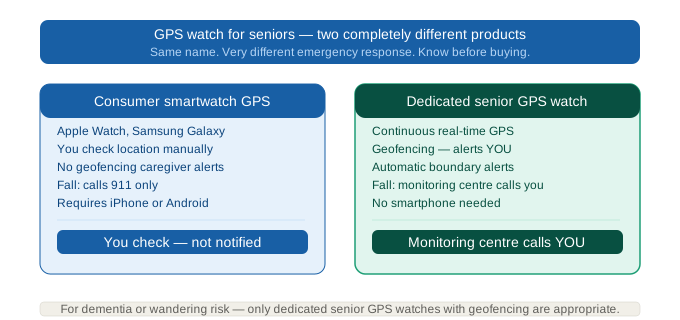
If you are searching for a GPS watch for seniors, this guide starts with the most important thing nobody tells you: there are two completely different products being called “GPS watch for seniors” — and they serve different seniors, different caregivers, and different emergencies.
Two Categories, One Search Term
The GPS watch for seniors category contains two fundamentally different types of device. Understanding which one you need is more important than comparing any individual product.
Category A — Smartwatch with GPS (Apple Watch SE, Samsung Galaxy Watch)
These are general-purpose consumer technology devices with GPS and fall detection built in. When fall detection triggers, the watch calls 911 and sends a text with location to emergency contacts. The senior’s location is visible via Find My (Apple) or Samsung Find.
Monthly cost: $10 (cellular plan add-on)
Requires: Compatible smartphone (iPhone for Apple Watch, Samsung phone for Galaxy Watch)
Monitoring centre: No — 911 only
Caregiver notification: Text alert after 911 is called
3-year total: $589–$689
Category B — Dedicated Senior GPS Watch with Monitoring Centre (Medical Guardian, Lively, Bay Alarm SOS)
These are purpose-built emergency response devices in watch form, with built-in cellular connectivity, GPS tracking, fall detection, and a professional 24/7 monitoring centre. When fall detection triggers or the button is pressed, a monitoring centre operator speaks with the senior and calls the caregiver — before dispatching emergency services.
Monthly cost: $20–$45/mo (includes monitoring, GPS, cellular)
Requires: Nothing — fully standalone, no smartphone needed
Monitoring centre: Yes — professional 24/7 response
Caregiver notification: Direct call to caregiver from monitoring centre
3-year total: $794–$1,718
The right category for your parent depends on one primary question: do you need a professional monitoring centre that calls you directly when something goes wrong, or is 911 auto-dispatch sufficient?
The Decision Tree — Which Category Is Right for Your Parent?
Does your parent have dementia or wandering risk?
→ Yes: Category B required. A GPS watch for seniors with a monitoring centre and geofencing is the only appropriate choice. Apple Watch calls 911 — it does not call you, does not provide geofencing alerts when your parent leaves a safe zone, and does not have a monitoring centre to speak with a confused dementia senior.
Does your parent have a compatible smartphone?
→ No: Category B is the only option. Apple Watch requires an iPhone. Samsung Galaxy Watch requires a Samsung phone. If your parent does not have a compatible phone, consumer smartwatches are not viable without adding a new phone to the cost.
Does your parent already use an iPhone and is cognitively intact?
→ Yes: Category A (Apple Watch SE) is a strong, cost-effective choice. $609 over three years is significantly less than dedicated senior GPS watches.
Does your parent need the caregiver notified before 911 is dispatched?
→ Yes: Category B. Professional monitoring centres assess the situation and call you first.
Category A — Apple Watch SE: Best Smartwatch GPS for Seniors
Apple Watch SE is the best GPS watch for seniors who are active, cognitively intact, already use an iPhone, and whose families are comfortable with 911-only emergency response.
The GPS watch for seniors use case: when fall detection triggers, the watch starts a 30-second countdown, then calls 911 and sends a text with GPS location to emergency contacts. The senior’s real-time location is visible via Find My on any paired iPhone.
Family Setup removes the need for your parent to have their own iPhone — you manage the watch from your own device, set emergency contacts, enable fall detection, and track location via Find My, all remotely.
Device: $249–$329
Monthly: ~$10 (cellular plan add-on)
Connectivity: Requires iPhone + cellular
Battery: ~18 hours — charge nightly
GPS: Yes — Find My location sharing
Fall detection: Yes — calls 911
Monitoring centre: No
Year 3 total: ~$609–$689
Best for: Active seniors with an existing iPhone. iPhone households on a budget. Tech-comfortable families. Lower-risk seniors who need GPS location and basic fall detection.
Honest limitations: 18-hour battery requires nightly charging — the watch is off the wrist during the highest-risk overnight hours without a deliberate daytime charging routine. No monitoring centre — 911 is the only emergency response. Requires an iPhone (senior or caregiver must have one for Family Setup).
Category A — Samsung Galaxy Watch: Best for Android Seniors
Samsung Galaxy Watch is the Android equivalent of Apple Watch SE in the GPS watch for seniors category. Fall detection is built in, cellular connectivity is available, and the form factor is a standard consumer smartwatch.
The limitation relative to Apple Watch: Samsung does not have a Family Setup equivalent — the watch integrates most naturally with a Samsung phone and typically requires more direct involvement from the senior in setup.
Device: $229–$349
Monthly: ~$10 (cellular plan add-on)
Battery: ~2 days
GPS: Yes
Fall detection: Yes — calls 911
Monitoring centre: No
Year 3 total: ~$589–$709
Best for: Android (Samsung) households. Tech-comfortable seniors with a Samsung phone.
Category B — Medical Guardian Smart Watch: Best Senior GPS Watch with Monitoring
Medical Guardian Smart Watch is the best dedicated senior GPS watch with a professional monitoring centre — and the right choice for caregivers who need more than a 911 auto-call when something goes wrong.
When fall detection triggers or the emergency button is pressed, the call routes to a CSAA Five Diamond certified monitoring centre. An operator speaks with the senior through the watch speaker, assesses the situation, and responds appropriately — calling the caregiver first, dispatching a neighbour, or sending emergency services. The monitoring centre does not dispatch an ambulance for every detected fall, including false alarms.
GPS tracking is built in and continuously active — the caregiver can check location via the companion app at any time. Geofencing alerts notify the caregiver when the senior moves outside a designated safe area — critical for dementia wandering prevention.
No smartphone required. The watch operates entirely independently via built-in cellular. Your parent simply wears it.
Device: $60–$100 (promotional)
Monthly: $44.95 (monitoring + GPS + cellular — all inclusive)
Battery: 24–48 hours
GPS: Yes — continuous, with geofencing alerts
Fall detection: Yes — routes to monitoring centre
Monitoring centre: Yes — CSAA Five Diamond certified
Caregiver app: Yes — real-time location, alert history
Year 3 total: ~$1,678–$1,718
Best for: Dementia and wandering risk. Seniors without a smartphone. Remote caregivers who need a monitoring centre to call them directly. Any situation where 911 auto-dispatch is not a sufficient emergency response.
Honest limitation: Most expensive GPS watch for seniors option at $44.95/mo. Over three years costs $1,029–$1,109 more than Apple Watch SE.
Category B — Lively Jitterbug Smart3: Best Value Senior GPS Watch
Lively Jitterbug Smart3 is the best value dedicated senior GPS watch — combining monitoring centre access, GPS tracking, and fall detection at a lower monthly cost than Medical Guardian.
It functions as both a smartwatch and a basic smartphone — the senior can make calls directly from the device. The Lively Urgent Response monitoring centre is available 24/7. GPS location is visible to caregivers via the Lively Link app.
Device: $75–$150
Monthly: $19.99–$29.99
Battery: 1–2 days
GPS: Yes
Fall detection: Yes — routes to Lively monitoring centre
Monitoring centre: Yes
Year 3 total: ~$794–$1,229
Best for: Budget-conscious caregivers who need monitoring. Seniors who want to make calls from the device. Families who want monitoring without Medical Guardian’s premium cost.
Category B — Bay Alarm SOS Smart Watch: Best Budget Senior GPS Watch
Bay Alarm SOS Smart Watch is the most affordable dedicated senior GPS watch with professional monitoring.
Device: $49–$79 (promotional)
Monthly: $24.95
Battery: ~24 hours
GPS: Yes — with caregiver portal
Fall detection: Yes (optional add-on)
Monitoring centre: Yes — Bay Alarm Medical monitoring
Year 3 total: ~$948
Best for: Budget-conscious caregivers who want dedicated senior GPS watch with monitoring at the lowest monthly cost. Bay Alarm Medical’s monitoring reputation (established PERS provider) adds credibility at a lower price point.
Clip-On Alternatives: When a Watch Isn’t the Right Form Factor
A GPS watch only works if your parent keeps it on their wrist. Some seniors, particularly those with dementia, remove a watch when it feels unfamiliar or medical. Before committing to a watch, it is worth knowing what the clip-on alternative offers.
Jiobit is a clip-on GPS tracker that attaches to a collar, belt, or pocket instead of the wrist. Its main advantage over every watch above: a 7-10 day battery, which eliminates the nightly charging window when a watch is off the body and untracked. Real-time GPS and geofencing alerts work the same as the dedicated watches, but Jiobit has no fall detection and no monitoring centre, it is a location tracker only. Device: $99-$129, Monthly: $14.99-$19.99, Year 3 total: ~$639-$849. Best for a parent who resists or removes wrist-worn devices, or for reliable overnight tracking without a charging routine.
For advanced dementia wandering with a tamper-resistant design and ambient voice monitoring, see our full AngelSense review.
A warning on Apple AirTag and Tile: both appear frequently in GPS tracker searches but are Bluetooth proximity devices, not GPS trackers. They only report location when another compatible device happens to pass nearby, so in a quiet street, at night, or in a rural area, an AirTag can go hours with no location update. Neither has geofencing, fall detection, or emergency response. Do not rely on an AirTag or Tile to track a wandering or at-risk senior.
What Happens When the GPS Watch Detects a Fall — Response Chain Comparison
This is the section that most clearly explains the cost difference between Category A and Category B — and why the monthly fee exists.
Apple Watch SE fall detection response:
1. Fall detected → 10-second countdown
2. No response → Watch calls 911
3. 911 dispatcher sends ambulance to registered address
4. Caregiver receives a text notification that an emergency call was made
5. Caregiver finds out details when they call back or arrive at the scene
Medical Guardian Smart Watch fall detection response:
1. Fall detected → monitoring centre connected
2. Operator speaks with senior: “This is Medical Guardian — are you okay?”
3. Senior cannot respond → operator calls caregiver directly (phone call, not text)
4. If caregiver unreachable → next contact tried → emergency services dispatched
5. Caregiver is informed of the situation and GPS location before emergency services arrive
The difference: Apple Watch puts the caregiver at the end of the chain. Medical Guardian puts the caregiver in the middle of it.
For a senior who falls and cannot speak — which is precisely the scenario fall detection is designed for — the monitoring centre approach means the caregiver knows what is happening before or simultaneously with emergency services, not after the hospital has admitted the senior.
GPS Watch for Seniors with Dementia
For a parent with dementia, the GPS watch category narrows to one option: Category B dedicated senior watches with geofencing and monitoring centre support.
Here is why Apple Watch fails for dementia:
No geofencing alerts: Apple Watch does not send an alert when the senior leaves a safe geographic zone. You can check their location in Find My — but you are not notified when they wander.
18-hour battery: A dementia senior who does not manage charging will leave the watch uncharged. The highest-risk wandering time (late night, early morning — sundowning) is when most caregivers are not physically present to ensure the watch is charged and on the wrist.
911-only response: A confused dementia senior cannot meaningfully interact with a 911 dispatcher. A monitoring centre operator trained in working with confused or disoriented seniors is a significantly more appropriate first response.
Medical Guardian Smart Watch for dementia:
Geofencing alerts notify the caregiver when the senior leaves the home or a designated safe area — the defining protection for wandering risk. The monitoring centre can speak calmly with a disoriented senior and assess whether emergency services are needed. GPS is continuously active and visible to the caregiver in real time.
The Hidden Cost of “Cheap” — True 3-Year Comparison
| Watch | Device | Monthly | Year 3 Total | Phone Required | Monitoring |
|---|---|---|---|---|---|
| Apple Watch SE | $249 | $10 | ~$609 | Yes (iPhone) | 911 only |
| Samsung Galaxy Watch | $229 | $10 | ~$589 | Yes (Samsung) | 911 only |
| Bay Alarm SOS | $49–$79 | $24.95 | ~$948 | No | Professional |
| Lively Jitterbug Smart3 | $75–$150 | $19.99–$29.99 | ~$794–$1,229 | No | Professional |
| Medical Guardian Smart Watch | $60–$100 | $44.95 | ~$1,678–$1,718 | No | Professional |
The Apple Watch’s apparent cost advantage disappears if your parent does not already have an iPhone. An iPhone SE starts at $429. A parent who needs an iPhone to use an Apple Watch has an effective first-year cost of $249 + $120 + $429 = $798 — more than Bay Alarm SOS or Lively for the first year, with no monitoring centre.
Setup — How Complex Is Each GPS Watch?
Apple Watch SE with Family Setup:
1. You need an iPhone with the latest iOS
2. Download Watch app, select “Set Up for Family Member”
3. Pair watch to your iPhone, not your parent’s
4. Add emergency contacts, enable fall detection, set up cellular plan ($10/mo)
5. Enable Find My location sharing
Time: 30–60 minutes. Tech-comfortable caregiver required.
Medical Guardian Smart Watch:
1. Unbox device
2. Call Medical Guardian to activate monitoring service
3. Provide emergency contact information
4. Charge device and place on parent’s wrist
Time: 10–15 minutes. No smartphone, no app, no tech knowledge required.
Frequently Asked Questions
Q: What is a GPS watch for seniors?
A: A wristwatch with built-in GPS that allows location tracking and emergency response. Two types: consumer smartwatches (Apple Watch, Samsung) that call 911 when fall detection triggers, and dedicated senior GPS watches (Medical Guardian, Lively, Bay Alarm) that connect to a professional monitoring centre and call the caregiver directly.
Q: Does a GPS watch for seniors need a phone?
A: Apple Watch requires an iPhone. Samsung Galaxy Watch requires a Samsung phone. Dedicated senior GPS watches (Medical Guardian, Lively, Bay Alarm SOS) are fully standalone — no phone required.
Q: What is the best GPS watch for seniors with dementia?
A: Medical Guardian Smart Watch — geofencing alerts when the senior leaves the home, professional monitoring centre that calls the caregiver, continuous GPS tracking. Apple Watch is not appropriate for dementia — no geofencing, 911-only response, and requires the senior to manage charging.
Q: How long does the battery last on a GPS watch for seniors?
A: Apple Watch SE: ~18 hours (charge nightly). Samsung Galaxy Watch: ~2 days. Bay Alarm SOS: ~24 hours. Medical Guardian Smart Watch: 24–48 hours. Lively: 1–2 days.
Q: Does a GPS watch for seniors need a monthly fee?
A: Consumer smartwatches require a $10/mo cellular plan add-on only. Dedicated senior GPS watches require a monitoring subscription ($20–$45/mo) that includes professional monitoring, GPS, and cellular connectivity.
Q: Does Medicare cover GPS watches for seniors?
A: Standard Medicare (Parts A and B) does not typically cover GPS watches. Some Medicare Advantage plans include PERS device coverage that may apply to dedicated senior GPS watches. Call your parent’s plan and ask specifically about PERS or medical alert device benefits. FSA/HSA funds can generally be used for dedicated medical alert watch device costs.
Q: What is the difference between an Apple Watch and a dedicated senior GPS watch?
A: Apple Watch calls 911 when fall detection triggers and sends you a text notification. A dedicated senior GPS watch calls a professional monitoring centre, whose trained operator speaks with your parent, calls you directly, and only dispatches emergency services when needed. Apple Watch requires an iPhone. Dedicated senior watches work standalone with no phone required.
Q: My mum has dementia — which GPS watch has geofencing alerts that text me when she leaves the house?
A: Medical Guardian Smart Watch — geofencing can be configured to send you an alert when your parent moves outside a designated safe zone. Apple Watch and Samsung Galaxy Watch do not have geofencing alert functionality for caregivers.
Q: What happens when a GPS watch detects a fall — does it call me or just 911?
A: Depends on the watch type. Apple Watch and Samsung Galaxy Watch call 911 directly, then send you a text notification. Medical Guardian Smart Watch, Lively, and Bay Alarm SOS connect to a professional monitoring centre that calls you directly before dispatching emergency services.
Q: My parent doesn’t have a smartphone — can they still use a GPS watch?
A: Yes — with a dedicated senior GPS watch. Medical Guardian Smart Watch, Lively Jitterbug Smart3, and Bay Alarm SOS all operate via built-in cellular with no smartphone required. Apple Watch and Samsung Galaxy Watch both require a compatible smartphone.
Q: Which GPS watch for seniors has the longest battery life?
A: Medical Guardian Smart Watch: 24–48 hours. Bay Alarm SOS: ~24 hours. Lively: 1–2 days. Samsung Galaxy Watch: ~2 days. Apple Watch SE: ~18 hours. For overnight coverage without a charging routine change, none of these match the Lively Wearable2 pendant (3–5 days) — but among GPS watches specifically, Medical Guardian and Bay Alarm are the strongest.
Q: Which GPS watch for seniors can track my parent in real time on a map from my phone?
A: All dedicated senior GPS watches (Medical Guardian, Lively, Bay Alarm SOS) provide real-time location via caregiver app. Apple Watch location is visible via Find My. Medical Guardian’s geofencing additionally sends automatic alerts when the senior leaves a designated area — passive monitoring without requiring the caregiver to actively check the app.
Q: Does insurance or Medicaid cover a GPS watch for seniors?
A: Some Medicare Advantage plans include PERS device benefits that may cover dedicated senior GPS watches, call your parent’s plan and ask specifically. Standard Medicare Part B may cover a device as Durable Medical Equipment if a physician prescribes it through a Medicare-enrolled supplier. Some state Medicaid HCBS waiver programmes fund PERS devices for qualifying seniors, contact your local Area Agency on Aging. FSA/HSA funds can generally be used for device and monitoring costs.
Q: What’s the difference between a GPS watch and a medical alert pendant?
A: A pendant provides emergency response only, press the button, reach a monitoring centre. A GPS watch does that plus location tracking, so you can see where your parent is and set geofencing alerts. If your parent mostly stays home, a pendant may be enough; if they go out alone or have wandering risk, GPS tracking matters.
Q: Does a GPS watch work indoors, and can I track my parent without them knowing?
A: The cellular connection works indoors, though GPS accuracy can dip slightly in basements or buildings with thick walls. On consent: most elder-care advisors recommend telling your parent about the watch and framing it as a safety tool rather than tracking covertly. For a cognitively intact adult, covert tracking raises ethical and legal questions, though the safety case is clearer for a parent with dementia who cannot meaningfully consent.
Q: Will the battery really last as long as advertised?
A: Budget for 15-20% less than the manufacturer’s stated battery life once geofencing and active GPS tracking are running, caregivers consistently report this gap. Build charging into your parent’s routine rather than relying on the advertised figure.
Our Final Recommendation
For an active senior with an iPhone, cognitively intact, whose family is comfortable with 911 response: Apple Watch SE is the best GPS watch for seniors at $609 over three years. Apple Watch SE
For a senior with dementia, wandering risk, or any need for a monitoring centre: Medical Guardian Smart Watch. Geofencing, professional monitoring, no phone required. Medical Guardian Smart Watch
For the best value monitoring watch: Lively Jitterbug Smart3 at $794–$1,229 over three years. Lively Jitterbug Smart3
For the most affordable dedicated senior GPS watch: Bay Alarm SOS Smart Watch at ~$948 over three years. Bay Alarm SOS Watch
Before purchasing: check your parent’s Medicare Advantage plan for PERS device coverage. Check whether your parent already has a compatible smartphone — if not, a dedicated senior watch is cheaper than buying a phone plus a consumer smartwatch.
If your parent has dementia or a wandering risk, see our dedicated GPS locator watch for seniors with dementia guide for a deeper look at geofencing, sundowning, and overnight safety.