If you just started looking into this, you probably have more questions than answers.
In This Guide
- Overview
- Comparison
- Best Options
- Our Recommendation
Does it work like a normal watch? Does it need a phone? Does it call 911, or someone else? How much does it cost every month — or is it a one-off purchase? And more pressingly: will your parent actually wear it?
Every other guide assumes you already know the answers to those questions. This one starts from the beginning.
By the end of this article about watches for seniors with fall detection, you will understand what a fall detection watch actually is, how the three different types compare, what happens when a fall is detected, and which watch is right for your parent’s situation — told simply and without jargon.
What Is a Watch for Seniors with Fall Detection?
A fall detection watch for seniors is a wristwatch that contains sensors capable of detecting the movement pattern of a fall. When a fall is detected, the watch automatically triggers an alert — without the senior needing to press any button. Caregivers evaluating watch for seniors with fall detection will find the key details in this section.
Most fall detection watches also have a manual emergency button: a dedicated button the senior can press if they need help for any reason, whether a fall, a medical emergency, or simply because they are frightened and cannot get up.
The watch connects to an emergency response system — either a professional monitoring centre staffed 24/7, or directly to 911 and preset emergency contacts, depending on the type of watch.
That is the core of it. Everything else is a variation on those three elements: sensor, button, connection.
Three Types of Fall Detection Watches
The most important thing to understand before comparing products is that “fall detection watch” describes three fundamentally different categories of device — with different costs, different response systems, and different requirements.
Type 1 — Medical Alert Watch (built for this purpose)
Designed specifically as a senior safety device. Built-in cellular — no phone required. Connects to a professional 24/7 monitoring centre when the button is pressed or fall detection triggers. A trained operator speaks with the senior through the watch and sends appropriate help.
Examples: Medical Guardian Active, Lively Wearable2, MobileHelp Solo
Monthly fee: $14.99–$47.95
Best for: Seniors living alone. Non-tech seniors. Seniors without smartphones.
Type 2 — Consumer Smartwatch with Fall Detection
General-purpose technology device — fitness tracking, notifications, apps, voice assistant — that includes fall detection as one feature among many. Calls 911 and texts emergency contacts when fall detection triggers. Does not connect to a monitoring centre.
Examples: Apple Watch SE, Samsung Galaxy Watch
Monthly fee: $10 (cellular plan add-on only)
Best for: Tech-comfortable seniors in iPhone or Android households.
Type 3 — Fitness Watch with Incident Detection
Activity-tracking watch that detects falls but requires a nearby smartphone via Bluetooth to communicate alerts. No standalone cellular.
Examples: Garmin Venu
Monthly fee: $0
Best for: Active seniors with low indoor fall risk who always carry their phone.
How Fall Detection Works on a Watch
Here is the simple version:
Inside every fall detection watch is an accelerometer — a sensor that measures movement speed and direction. It is the same technology in your smartphone that rotates the screen when you turn the phone sideways.
When a senior falls, the accelerometer registers a specific pattern: rapid downward movement followed by a sudden stop. The watch’s software identifies this pattern as a fall signature and begins the response process.
Auto-detect vs manual button: Auto-fall detection triggers without any action from the senior. The manual button is the primary trigger — pressed deliberately when help is needed. Both are present on most devices. Auto-detection is the backup for situations where the senior cannot press the button.
What about false alarms: Yes, they happen. Sitting down heavily, dropping the watch, or vigorous exercise can sometimes mimic a fall signature. This is why professional monitoring centres screen every alert before dispatching emergency services — and why consumer watches that call 911 automatically generate occasional false alarm ambulance visits.
The Three Response Models — What Happens After a Fall Is Detected
This is the section most caregivers wish someone had explained before they bought a device.
Response Model 1 — Professional Monitoring Centre
Device: Medical Guardian Active, Lively Wearable2
What happens: Fall detected → operator speaks with senior through watch → operator assesses situation → calls caregiver, dispatches neighbour, or sends emergency services as needed → no ambulance for false alarms
Response Model 2 — 911 Direct
Device: Apple Watch, Samsung Galaxy Watch
What happens: Fall detected → 10-second countdown → if no response, calls 911 and texts emergency contacts with GPS location → ambulance dispatched automatically → false alarms generate real emergency response
Response Model 3 — Caregiver Text Only
Device: Garmin (via phone), some basic trackers
What happens: Fall detected → text sent to preset contacts → no professional response → relies on caregiver receiving and acting on the text promptly
For a senior who lives alone with no family nearby: Response Model 1 (professional monitoring) is clearly the safest choice.
For a senior with family who can always be reached within minutes: Response Model 2 may be sufficient, with the understanding that false alarms will occasionally trigger 911 calls.
Response Model 3 is only appropriate for low-risk seniors where a text to a nearby family member is a reliable and fast enough response.
Does Your Parent Need a Smartphone?
This is one of the most common questions from caregivers new to this category — and the answer varies significantly by device.
Medical Guardian Active: No phone required. Cellular is built in. The senior simply wears the watch.
Lively Wearable2: No phone required. Cellular is built in. No setup from the senior needed.
Apple Watch SE with Family Setup: No phone required for the parent. The caregiver manages everything from their own iPhone. The parent just wears the watch.
Samsung Galaxy Watch: Generally requires a nearby Samsung phone for full functionality.
Garmin Venu: Requires a phone via Bluetooth. If the phone is not nearby, alerts cannot be sent.
For seniors without smartphones — which includes a significant proportion of the 75+ demographic — medical alert watches (Medical Guardian, Lively) or Apple Watch with Family Setup are the appropriate options.
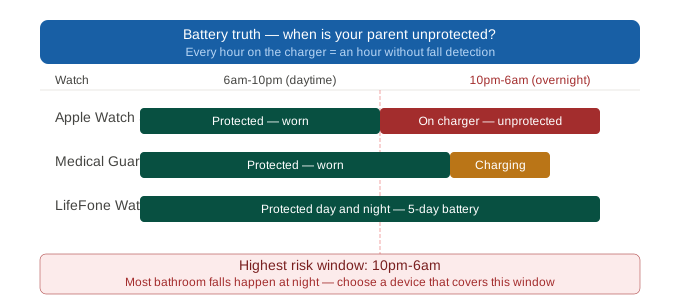
The Battery Truth — Which Watch Can Be Worn Overnight
This is the section that most caregivers discover too late.
The majority of serious senior falls happen between midnight and 6am. This is when the risk is highest: low light, sleep disorientation, reduced balance, urgent need for the bathroom creating rushed movement.
If the watch is on the charger during these hours, it provides no protection.
Here is the honest picture for each watch:
Apple Watch SE (~18 hours): Charge nightly. Cannot be worn overnight unless deliberately charged for 1–2 hours during the day.
Samsung Galaxy Watch (~2 days): Can sometimes skip one night of charging. Partial overnight coverage depending on usage.
Medical Guardian Active (~24 hours): Charge during a daytime window — shower, lunch, afternoon nap. Can be worn overnight if this routine is established.
Lively Wearable2 (3–5 days): Charge once or twice per week. Worn to bed every night. The only device that reliably covers overnight hours without any new routine.
Garmin Venu (5–7 days): Long battery — but requires a phone nearby via Bluetooth. If the phone is charging in another room, overnight protection is limited.
Lively Wearable2 — Our Editor’s Choice
Lively Wearable2 is our Editor’s Choice for the broadest range of caregiver scenarios. Here is why:
It is the only watch with both professional monitoring and a battery long enough to be worn overnight every night. Those two features together — monitoring centre response and consistent overnight coverage — cover the two most common protection gaps in this category.
It is also the simplest fall detection watch available. One large emergency button. No apps. No smartphone pairing required for the senior. Setup can be completed in minutes by a caregiver, remotely, over the phone.
Device fee: $99–$149 (one-time)
Monthly: $14.99–$24.99 (Urgent Response plan — includes fall detection)
Battery: 3–5 days
GPS: Built in
Year 3 total: ~$689
Contract: Month-to-month
Best for: Non-tech seniors. Nighttime fall risk. Parents who forget to charge devices. Professional monitoring at the lowest available monthly cost.
Honest limitation: Not a full consumer smartwatch. No music, notifications, or health apps beyond basic activity tracking. Parents who want a “real smartwatch” experience will prefer Apple Watch or Samsung.
Medical Guardian Active — Best for Maximum Safety
For seniors at high fall risk — living alone, recently hospitalised, post-stroke, or with dementia — Medical Guardian Active provides the strongest professional safety net available in watch form.
CSAA Five Diamond certified monitoring. GPS tracking for indoor and outdoor coverage. Auto-fall detection. Two-way voice through the watch speaker. No smartphone required.
Monthly: $47.95 (all-inclusive)
Device: $0
Battery: ~24 hours — charge during day for overnight coverage
Year 3 total: $1,726.20
Best for: Solo seniors. Dementia with wandering risk. Maximum safety requirement.
Apple Watch SE — Best for iPhone Families
For families already in the Apple ecosystem, Apple Watch SE delivers fall detection at the lowest three-year cost in the category: $609.
Family Setup allows caregiver management from a separate iPhone. Fall detection is built in. GPS is included. The watch looks like a standard consumer device — no medical stigma.
Device: $249
Monthly: $10 (cellular plan)
Battery: ~18 hours — charge nightly
Year 3 total: $609
Monitoring: 911 only
Best for: iPhone households, budget-conscious caregivers, tech-comfortable seniors.
Samsung Galaxy Watch — Best for Android
Android equivalent of Apple Watch SE. Fall detection built in, cellular available, consumer smartwatch features. Best integrated with Samsung phones.
Device: $199–$349
Monthly: $10
Battery: ~2 days
Year 3 total: ~$610
Monitoring: 911 only
Watch vs Pendant — Which Is Right for Your Parent?
Now that you understand the watch category, it helps to know when a pendant might actually be the better choice.
Choose a watch when:
- Your parent refuses to wear a pendant (acceptance is the primary problem)
- Your parent is active outside the home and needs GPS coverage
- Your parent wants a device that does not look medical
Choose a pendant when:
- Your parent is comfortable with a pendant and already wears it consistently
- Budget is the primary concern (in-home pendants start at $27.95/mo — often cheaper than watches)
- Your parent has dexterity issues that make wearing a wrist device difficult
- Your parent’s home requires a wide in-home range (1,000 ft base station coverage)
There is no universally correct answer between pendant and watch. The right answer is whichever device your parent will actually wear every day.
Frequently Asked Questions
Q: Can a smartwatch detect falls in seniors?
A: Yes. Apple Watch, Samsung Galaxy Watch, Medical Guardian Active, and Lively Wearable2 all detect falls automatically using accelerometer and gyroscope sensors. Modern fall detection accuracy is strong for significant falls; smaller impacts or unusual fall angles may occasionally be missed.
Q: What is the best watch for seniors with fall detection?
A: Depends on the scenario. Best overall: Lively Wearable2 (professional monitoring, long battery). Best for maximum safety: Medical Guardian Active. Best value for iPhone families: Apple Watch SE. Best for Android: Samsung Galaxy Watch.
Q: Do I need a subscription for a fall detection watch?
A: Medical alert watches (Medical Guardian Active, Lively) require a monthly monitoring plan ($14.99–$47.95). Consumer smartwatches (Apple Watch, Samsung) require a $10/mo cellular plan add-on only. Garmin Venu has no monthly fee but requires a phone nearby.
Q: What is the difference between a medical alert watch and a smartwatch?
A: A medical alert watch (Medical Guardian Active, Lively) connects to a professional monitoring centre. A consumer smartwatch (Apple Watch, Samsung) calls 911 directly. Medical alert watches do not require a smartphone. Consumer smartwatches require phone pairing or plan management.
Q: Does a fall detection watch work without a phone?
A: Medical Guardian Active and Lively Wearable2 work without any phone — cellular is built in. Apple Watch works without the parent having a phone via Family Setup. Samsung Galaxy Watch generally requires a phone for full functionality. Garmin requires a phone via Bluetooth.
Q: How long does the battery last on a fall detection watch?
A: Apple Watch SE: ~18h. Medical Guardian Active: ~24h. Samsung Galaxy Watch: ~2 days. Lively Wearable2: 3–5 days. Garmin Venu: 5–7 days.
Q: Is a fall detection watch better than a pendant?
A: For acceptance: usually yes — watches have higher consistent wear rates than pendants. For cost: sometimes no — pendants start at $27.95/mo, watches at $14.99/mo + device cost. The right choice is whichever your parent will wear every day.
Q: I’m just starting to look for a watch for my mum — what should I know first?
A: Three things: (1) There are two types — medical alert watches (professional monitoring) and consumer smartwatches (911 only). (2) Battery life determines overnight protection — only Lively’s 5-day battery allows reliable overnight wear. (3) Your parent doesn’t need a smartphone — medical alert watches and Apple Watch with Family Setup both work without the senior having a phone.
Q: Can my mum use an Apple Watch without having her own phone?
A: Yes — via Family Setup. You configure and manage the Apple Watch from your own iPhone. Your parent does not need any phone. Emergency contacts, fall detection, and GPS location are all managed by the caregiver remotely.
Q: Will a fall detection watch work at night when my mum is sleeping?
A: Only if it is being worn and has battery. Lively Wearable2 (5-day battery) is the only device that can realistically be worn to bed every night. Apple Watch (18h) must be charged nightly unless a daytime charging routine is established. Confirm the charging routine with your parent before relying on any watch for overnight protection.
Q: What is the difference between a watch that calls me vs a watch that calls a monitoring centre?
A: A watch that calls you (caregiver contact text — some basic trackers) relies on you receiving the notification and responding promptly. A watch that calls a monitoring centre routes every alert to a trained operator who speaks with your parent, assesses the situation, and dispatches appropriate help even if you are unavailable. For solo seniors or high-risk situations, a monitoring centre is significantly more reliable than caregiver-only notification.
Q: Is there a watch for seniors with fall detection that doesn’t need charging every night?
A: Yes — Lively Wearable2 has a 3–5 day battery and needs charging once or twice per week. Garmin Venu has a 5–7 day battery but requires a phone nearby. All other major fall detection watches need daily or every-other-day charging.
Q: Will a watch with fall detection help if my mum has dementia?
A: In early to moderate dementia, yes. For mild dementia, Apple Watch with Family Setup allows caregiver-managed remote operation. For moderate dementia, Lively Wearable2’s simple interface and long battery reduce daily compliance burden. For advanced dementia where your parent removes wearables, a room-based sensor (Vayyar Care) is more appropriate.
Our Final Recommendation
Start with Lively Wearable2 if you are unsure — it covers the widest range of situations with professional monitoring, the longest battery, and the simplest interface. Lively
If your parent lives alone at high risk: Medical Guardian Active provides the strongest professional safety net. Medical Guardian
If your family uses iPhone: Apple Watch SE at $609 over three years is the best value option. Apple Watch
If your family uses Android: Samsung Galaxy Watch. Samsung Galaxy Watch
Before buying anything: call your parent’s Medicare Advantage plan and ask about PERS device coverage. Some plans include fall detection devices at no additional cost.