He spent three evenings reading reviews.
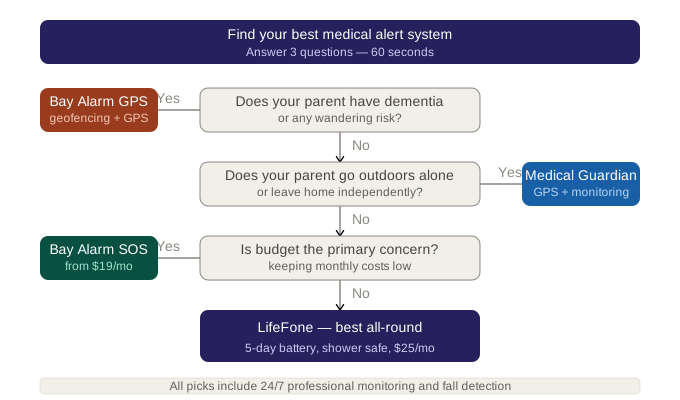
In This Guide
- Overview
- Comparison
- Best Options
- Our Recommendation
When shopping for the best medical alert systems for seniors, the options can be incredibly confusing. On Monday he read that Medical Guardian was the best. On Tuesday he read that LifeFone was the editors’ choice. On Wednesday he found an article that declared Bay Alarm Medical the winner on value, and a forum post from someone who said all three were basically the same product in different packaging.
On Thursday morning he called his sister to ask what she thought. She had a different tab open. It said MobileHelp.
He was not confused because the reviews were wrong. He was confused because they were all answering a question he was not actually asking. They were answering: “Which medical alert system performs best on standardised comparison criteria?”
He needed the answer to a different question: “Which medical alert system is best for my 81-year-old father, who lives alone in a two-storey house, has type 2 diabetes, refused to wear the last pendant we tried, and whose neighbours are away for three months?”
That is a question with a specific answer. This article gives it to you.
Why “Best” Depends on Your Parent’s Situation
Every major review site uses the same approach: test a set of best medical alert systems for seniors against criteria like response time, battery life, range, fall detection accuracy, price, and customer service. The system that scores highest across those criteria gets named “best.”
Medical Guardian wins most of those rankings. That is a genuine reflection of its quality — particularly its monitoring centre certification, fall detection accuracy, and device ecosystem. It is not marketing fiction.
But “best across standardised criteria” is not the same as “best for your parent.” Here is why:
A 600 ft in-home range is “best” if your parent lives in an apartment. It is a liability if they live in a 2,500 sq ft ranch home.
The “best” fall detection accuracy is irrelevant if your parent will not wear the device.
The “best” monitoring quality does not help if your parent has dementia and wanders outside the system’s coverage area.
What follows is the honest, scenario-matched answer to “which is best” — broken down by the specific situations caregivers actually face.
Best Overall — Medical Guardian Classic ($37.95/mo)
For the most common caregiver scenario — a parent living alone, at moderate fall risk, in a medium-sized home — Medical Guardian Classic earns its place as the best overall system.
Why it wins: Medical Guardian’s monitoring centres are CSAA Five Diamond certified, the highest industry accreditation for emergency response operations. This means 24/7 staffing, redundant backup systems, and response protocols that continue to function when the primary monitoring centre has an issue. When your parent presses the button at 3am, that certification is what determines what happens next.
Medical Guardian also operates the Active smartwatch — the best solution in the category for parents who refuse to wear a pendant. Having both options within one provider means you can switch form factors without changing your account, monitoring contract, or emergency contact setup.
- Range: 600 ft (in-home classic)
- Monthly cost (base): $37.95
- Monthly cost (with fall detection): $47.95
- Contract: Month-to-month
- Year 1 total (with fall detection): $575.40
- Year 3 total (with fall detection): $1,726.20
When Medical Guardian is NOT the best choice: When budget is a primary constraint, when your parent’s home requires more than 600 ft coverage, or when you need the lowest possible monthly cost for a long-term commitment. Bay Alarm Medical addresses all three of these scenarios at lower cost.
Best Value — Bay Alarm Medical ($27.95/mo)
Bay Alarm Medical is the best medical alert system for caregivers who need professional-quality monitoring without the Medical Guardian price premium.
At $27.95/mo base with a 1,000 ft in-home range — the widest in the affordable tier — Bay Alarm provides more home coverage at a lower cost than any comparable provider. The $10/mo fall detection add-on is in line with the category standard. The OFFER17 promo code (17% off annual billing) reduces the effective monthly rate further, to approximately $23.20/mo.
The monitoring quality is not CSAA Five Diamond certified — which is the one meaningful advantage Medical Guardian holds. In practice, Bay Alarm Medical’s emergency response receives strong caregiver satisfaction ratings. For most seniors at moderate fall risk, the monitoring quality is sufficient and the $10/mo premium for Medical Guardian’s certification level is difficult to justify.
- Range: 1,000 ft (best in affordable tier)
- Monthly cost (base): $27.95
- Monthly cost (with fall detection): $37.95
- Year 1 total (with fall detection, no promo): $455.40
- Year 3 total (with fall detection, no promo): $1,366.20
- Year 3 cost advantage over Medical Guardian: $360
Best for: Most caregivers looking for affordable options. Seniors in medium-to-large homes who need wide coverage. Families where cost is a meaningful decision factor.
Best for Dementia and Wandering Risk — Medical Guardian Mobile ($44.95/mo)
Dementia changes the criteria for “best” in fundamental ways.
A standard in-home button pendant assumes the senior will: (1) wear the device consistently, (2) recognise when they need help, and (3) press the button deliberately. Dementia progressively compromises all three of these assumptions.
For a parent with moderate dementia, the best medical alert system is one that:
- Detects falls automatically (removing the requirement to press a button)
- Provides GPS tracking (covering wandering outside the home as well as falls inside it)
- Dispatches emergency services to a current GPS location, not just a fixed home address
Medical Guardian Mobile provides all three. It is a GPS pendant with built-in auto-fall detection and two-way communication, supported by Medical Guardian’s CSAA Five Diamond monitoring centre.
When a dementia parent with Medical Guardian Mobile wanders out of the house and falls two streets away, the monitoring centre can dispatch emergency services to the GPS coordinates — not to the home address where no one is.
- Monthly cost: $44.95 (GPS and fall detection included — no add-ons)
- Year 3 total: $1,618.20
Best-value alternative for dementia: Bay Alarm Medical SOS GPS+ ($37.95/mo, fall detection included). Provides GPS and auto-fall detection at a lower monthly rate. The monitoring quality is not Five Diamond certified, but covers the core requirements for dementia at $252 less per year.
Best for Stubborn Parents Who Refuse a Pendant — Medical Guardian Active Smartwatch ($47.95/mo)
This deserves its own section because it is one of the most common and most frustrating caregiver problems — and it has a specific solution.
The parent who refuses a pendant is not being irrational. They are asserting: “I am not someone who wears a medical device around their neck. That is not who I am.” The pendant signals vulnerability, dependency, and the beginning of a loss of independence. That is a meaningful identity statement, not stubbornness.
The Medical Guardian Active is a GPS smartwatch. It looks like a fitness watch — similar to devices worn by millions of people under 65 for health tracking. It has auto-fall detection, two-way calling, and GPS built in. When worn, it is connected to Medical Guardian’s monitoring centre at all times.
For a parent who has refused every traditional pendant: show them the Active. Do not introduce it as a medical alert device. Introduce it as a watch. “I thought you might like this — it’s a smartwatch that also has an emergency button if you ever need it.” Many caregivers report that parents who flatly refused pendants accepted the Active watch without resistance.
- Monthly cost: $47.95 (fall detection and GPS included)
- Year 3 total: $1,726.20
Honest limitation: The highest monthly cost in this guide. Requires regular charging (typically every 1–2 days, depending on usage). The watch form factor means it must be remembered and maintained — this may not be suitable for seniors with significant cognitive decline who cannot reliably charge a device. For dementia parents, the Mobile pendant (which they may not realise is a medical device) is often more practical than a watch that requires active management.
Best for Nighttime Safety — Bay Alarm In-Home with Bathroom Wall Button ($37.95/mo + wall button)
The statistics on senior falls are consistent: most occur between 10pm and 6am, in the bedroom or on the way to the bathroom. Alongside an alert system, physical safeguards in the bathroom itself matter — our bathroom accessories for seniors checklist covers that layer. The medical alert system that best protects against this is not the most expensive — it is the one with the widest range plus the most strategically placed secondary alert points.
Bay Alarm Medical’s 1,000 ft in-home range provides coverage across the full bedroom-to-bathroom distance in most homes. Adding a wall button beside the toilet ($20–$50 additional) creates a second trigger point at the specific location where most bathroom falls occur.
The critical instruction for nighttime safety that no review site includes: the pendant must be worn at night. A device on the nightstand protects no one. This requires a conversation with your parent before assuming the system provides overnight coverage.
For seniors who remove neck pendants for sleep: Bay Alarm Medical’s wristband option is more comfortable for overnight wear. Confirm availability with the provider at the time of purchase.
Best for No-Contract Flexibility — LifeFone At-Home ($29.95/mo)
All major providers offer month-to-month plans. But LifeFone earns its place in a “best” guide specifically through its customer service quality — consistently rated the highest in the category — and its remarkably long pendant battery life (often 7+ days), which addresses one of the most common practical failures in medical alert systems: a flat battery at the critical moment.
LifeFone is the best choice when:
- Your parent’s situation is temporary or uncertain in duration (post-surgery, recovering from a fall, trial period before moving into assisted living)
- You want maximum flexibility with minimum friction if circumstances change
- Long battery life is a priority to reduce the risk of an uncharged device
- Customer service access matters to you at any hour
LifeFone’s at-home plan offers 1,000 ft range, matching Bay Alarm Medical, at $29.95/mo — $2/mo more but with the activation fee ($25) as the only meaningful upfront cost.
- Year 3 total (with fall detection): $1,284.40
Best Budget Entry-Level — MobileHelp Solo ($27.95/mo)
For caregivers who need professional monitoring at the lowest possible price with the least setup complexity, MobileHelp Solo at $27.95/mo is the strongest entry-level option.
MobileHelp’s primary advantage is simplicity. The system can be set up with minimal technical knowledge, making it well-suited for caregivers managing the installation by phone instruction from another state, or for seniors who will be involved in their own setup.
The 600 ft range is adequate for apartments and smaller homes. Fall detection is available for $5/mo. No activation fee, no contract.
- Year 3 total (with fall detection): $1,186.20
Honest limitation: 600 ft range limits coverage in larger homes. Less brand investment in technology features compared to Medical Guardian or Bay Alarm. For most caregivers, Bay Alarm Medical at the same base price ($27.95/mo) provides better range and a lower fall detection add-on — making MobileHelp the right choice primarily for caregivers who specifically value setup simplicity over feature optimisation.
The 3-Year Cost Reality Check
The monthly price comparison obscures the most important number: what you will actually spend over the time your parent uses this system.
| System | Monthly with Fall Detection | Year 1 | Year 3 |
|---|---|---|---|
| Medical Guardian Classic | $47.95 | $575.40 | $1,726.20 |
| Medical Guardian Mobile | $44.95 | $539.40 | $1,618.20 |
| Medical Guardian Active | $47.95 | $575.40 | $1,726.20 |
| Bay Alarm SOS GPS+ | $37.95 | $455.40 | $1,366.20 |
| LifeFone At-Home | $34.95* | $444.40* | $1,284.40* |
| Bay Alarm In-Home | $37.95 | $455.40 | $1,366.20 |
| MobileHelp Solo | $32.95 | $395.40 | $1,186.20 |
*LifeFone includes $25 one-time activation fee in Year 1.
The gap between the most expensive option (Medical Guardian Active or Classic at $1,726.20) and the least expensive full-featured option (Bay Alarm In-Home with fall detection at $1,366.20) over three years: $360.
That $360 is the premium you pay for Medical Guardian’s CSAA Five Diamond monitoring certification and the option to switch to the Active smartwatch form factor within the same account.
For many high-risk seniors, that premium is worth it. For most moderate-risk seniors, Bay Alarm’s monitoring quality is sufficient.
The 5 Questions to Ask Before Buying Any “Best” System
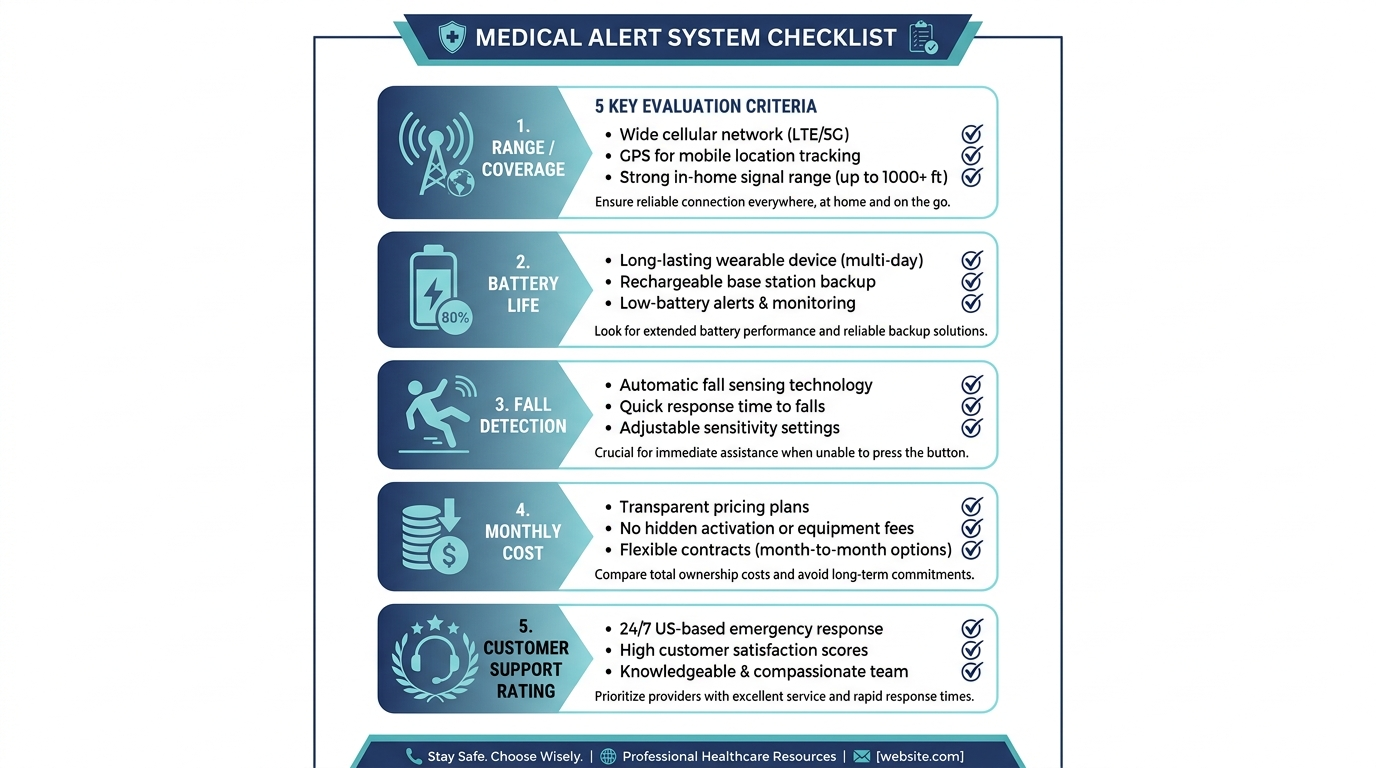
Do not complete a purchase without answers to these five questions:
1. What is your monitoring centre’s CSAA certification level?
CSAA Five Diamond is the highest standard. “Fully certified” and “certified” are not the same as “Five Diamond.” Ask specifically.
2. If my parent cannot speak when an alert triggers, what happens?
The answer should be: emergency services are dispatched automatically after a set period without vocal confirmation. If the answer is “we will call the contact list until someone answers” — that is an unmonitored system disguised as monitored.
3. What is the exact cancellation process?
Month-to-month means you can cancel, but ask: minimum notice period, equipment return process, whether the return postage is your cost, and what happens if equipment is not returned.
4. What happens during a power outage?
Backup battery duration, cellular versus landline fallback, and whether the wearable device continues to function independently of the base station.
5. How do I update emergency contacts and their priority order?
Circumstances change. You need to be able to update who gets called and in what order without a friction-heavy process. Ask how this is done and confirm it can be completed online rather than requiring a phone call.
Frequently Asked Questions
What is the best medical alert system for seniors?
The best system depends on your parent’s specific situation. Overall: Medical Guardian Classic. Best value: Bay Alarm Medical. Best for dementia: Medical Guardian Mobile or Bay Alarm SOS GPS+. Best for pendants refused: Medical Guardian Active smartwatch. Best for nighttime falls: Bay Alarm In-Home with bathroom wall button. Best for flexibility: LifeFone.
What is the number one rated medical alert system?
Medical Guardian is the most consistently top rated medical alert systems pick across major review sites, based on monitoring centre quality (CSAA Five Diamond), fall detection accuracy, and device ecosystem. Bay Alarm Medical is rated #1 for value by most sites that include cost as a primary ranking factor.
Which medical alert system is best for fall detection?
Medical Guardian has the highest-rated auto-fall detection accuracy, particularly for the Mobile and Active units. LifeFone offers the most affordable fall detection add-on at $5/mo, along with a dual-protection approach combining manual and auto detection.
Are the best medical alert systems for seniors covered by Medicare?
Standard Medicare (Parts A and B) does not cover the best medical alert systems for seniors. Some Medicare Advantage plans include personal emergency response systems as a supplemental benefit. Call your parent’s plan’s member services and ask specifically about PERS coverage. Some Medicaid HCBS waivers also fund PERS devices for qualifying seniors. You can also contact the Eldercare Locator for guidance on local assistance programmes.
Can I get a medical alert system without a contract?
Yes. All major and best medical alert systems for seniors in this guide — Medical Guardian, Bay Alarm Medical, LifeFone, MobileHelp — are month-to-month with no long-term contract. Annual billing discounts are available but not required.
Which medical alert system do doctors recommend?
Medical Guardian is the most frequently mentioned brand in clinical settings, primarily due to its CSAA Five Diamond monitoring centre certification and strong brand recognition. LifeFone is sometimes recommended specifically for its customer service quality and long battery life. There is no formal medical authority endorsement process — “doctor recommended” is typically based on professional familiarity with the brand.
What is the medical alert system with the longest range?
Bay Alarm Medical and LifeFone both offer 1,000 ft in-home range — the longest available in the affordable and mid-range tiers. Medical Guardian Classic covers 600 ft. For outdoor coverage beyond in-home range, see our guide to home medical alert systems with GPS options.
What is the best medical alert system for a parent with dementia or Alzheimer’s?
Medical Guardian Mobile ($44.95/mo) is the best overall choice: GPS tracking for wandering risk, auto-fall detection for seniors who may not press a button, and professional dispatch to GPS location rather than fixed address. Bay Alarm SOS GPS+ ($37.95/mo) is the best-value alternative covering the same core needs at lower cost.
Which “best” system has the lowest total cost over 3 years?
LifeFone At-Home with fall detection: $1,284.40 over 3 years, with Bay Alarm In-Home close behind at $1,366.20 — both well below Medical Guardian Classic with fall detection ($1,726.20). See our 3-year cost table above for the full comparison across all systems.
What if the best system I buy doesn’t work in my parent’s home — can I return it?
All major providers are month-to-month with no contract. You can cancel any time. Equipment must be returned — ask about the return process and postage responsibility before purchasing. Most providers offer a 30-day trial period with a refund guarantee. Ask specifically: “What is your return policy if the system doesn’t work well in my parent’s home?”
Which medical alert system is best for a parent who refuses to wear a pendant?
Medical Guardian Active smartwatch. It looks like a normal fitness watch, includes GPS and auto-fall detection, and is supported by Medical Guardian’s monitoring centre. Many caregivers report that parents who refused every pendant accepted the Active watch without resistance.
What questions should I ask before buying the #1 rated system?
The five questions to ask any provider: (1) What is your CSAA monitoring certification level? (2) What happens if my parent cannot speak during an alert? (3) What is the exact cancellation and return process? (4) What happens during a power outage? (5) How do I update my emergency contacts? See the full Q&A above for recommended answers to each.
Does the best medical alert system work if my parent falls in the backyard?
Depends on the system type. In-home systems (pendants connected to a base station) have a fixed range — typically 600–1,000 ft from the base station. A large backyard beyond that range will not be covered. For seniors who spend time in a garden or yard beyond the base station’s range, a GPS-enabled system (Medical Guardian Mobile, Bay Alarm SOS GPS+) provides outdoor coverage regardless of distance from home.
Our Final Recommendation
There is no single best medical alert system for all seniors. But there is a best system for your parent’s situation — and after reading this guide, you should be able to identify it.
For most parents living alone at moderate fall risk: Medical Guardian Classic is the best overall system, and the $47.95/mo cost with fall detection is the price of the highest monitoring quality in the category.
For the same protection at significantly lower cost: Bay Alarm Medical at $37.95/mo with fall detection costs $10/mo less than Medical Guardian and delivers equivalent safety for most moderate-risk seniors. Use OFFER17 on annual billing to reduce the cost further.
For parents with dementia or wandering risk: Medical Guardian Mobile or Bay Alarm SOS GPS+. GPS and auto-fall detection together. Non-negotiable for this scenario.
For parents who will not wear a pendant: Medical Guardian Active smartwatch. Nothing else solves this specific problem as well.
For flexibility and accessible customer service: LifeFone. Best battery life, best customer service ratings, month-to-month with no friction.
Before you purchase, check your parent’s Medicare Advantage plan for PERS coverage. Ask the five questions above. And if your parent has already refused one system, do not buy the same form factor again — change the approach before changing the provider.
The best medical alert system is the one your parent actually wears.
If you’re looking specifically for a pendant-style device, see our guides to medical alert necklaces for seniors and alert pendants for seniors.
This article was researched and written by the SafeElderCare editorial team, which evaluates senior safety products to help family caregivers make confident, informed decisions for the people they love most.