It was 2am when Rachel first typed those words into Google. She had found her father confused in the kitchen an hour earlier — standing at the counter in the dark, unable to remember why he’d walked in. He was fine. But she wasn’t. She sat at her laptop with a glass of water and a knot in her stomach, trying to figure out how to protect a man who insisted he didn’t need protecting — without spending money she didn’t have on a monthly bill that would run forever. She needed medical alert systems for seniors, no monthly fee required.
In This Guide
Whether you have searched for medical alert systems for seniors no monthly fee or simply want to stop paying a recurring bill, this guide gives you honest answers — not affiliate rankings dressed up as advice.
If that moment sounds familiar, this article was written for you.
You’re not shopping for a gadget. You’re trying to solve a very specific problem: how do you get your parent the protection they need without committing to another subscription that drains their fixed income — or yours — every single month?
This guide answers that question honestly. We’ll show you exactly what “no monthly fee” actually means (it’s not always what it sounds like), compare the real total cost of each system over one, two, and three years, and tell you which options work for seniors with dementia, nighttime fall risk, and stubborn personalities who refuse to wear anything at all.
Medical Alert Systems for Seniors: No Monthly Fee Options Explained — Medical Alert Systems For Seniors No Monthly Fee
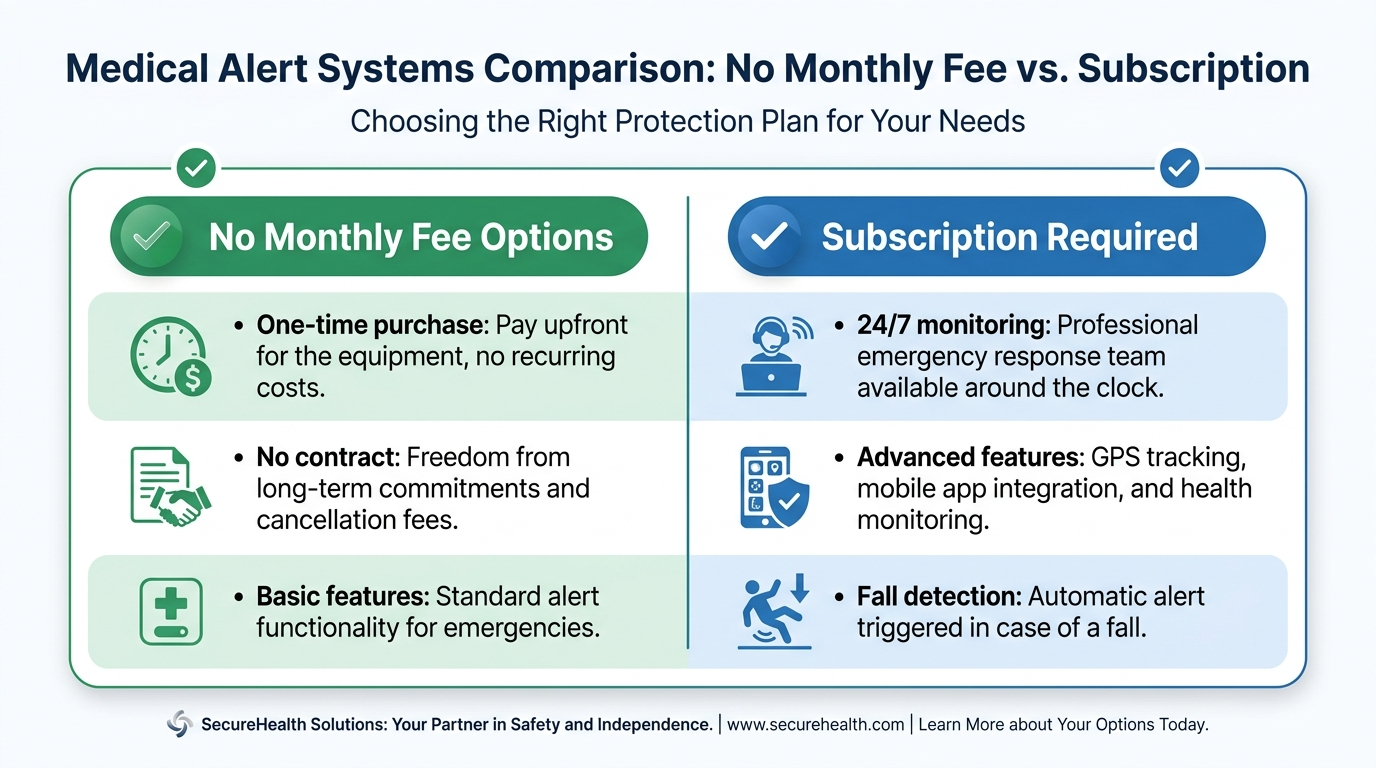
Here’s the confusion that trips up almost every caregiver researching medical alert systems for seniors no monthly fee: “no monthly fee” does not mean the system is free. It means you pay once for the equipment and own it — but the emergency monitoring that calls 911 when your parent presses the button may still cost money.
There are two genuinely different types of no-monthly-fee systems:
The first is unmonitored. You buy the device. When your parent presses the button, it automatically calls a preset list of numbers — you, a sibling, a neighbour — in sequence. There is no professional monitoring centre. No one trained in emergencies picks up. If your parent is unconscious and can’t speak, the phone rings until someone answers or doesn’t.
The second is truly monitored with no ongoing contract. Bay Alarm Medical and LifeFone offer plans where you purchase the device outright and pay no recurring monthly fee — but professional monitoring is still included, either self-funded through the device purchase price or available as a very low-cost optional add-on.
Understanding which type you’re looking at is the most important thing you’ll do in this research. Millions of caregivers searching for medical alert systems for seniors no monthly fee make this mistake every year.
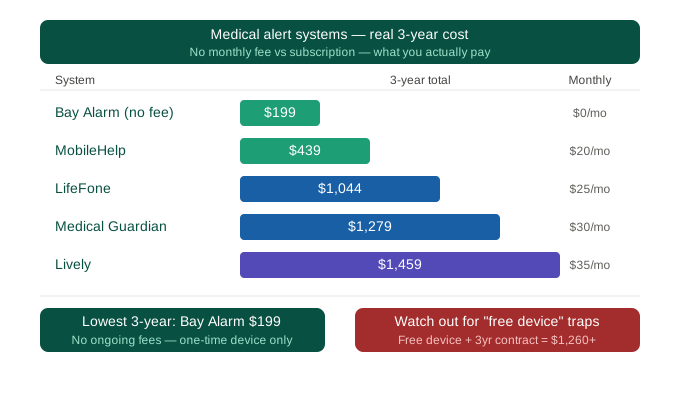
The Real Cost of No-Monthly-Fee Systems (Year 1 vs Year 2 vs Year 3)
This is the table no competitor publishes. Most sites compare monthly costs. But for medical alert systems for seniors no monthly fee, if your parent is going to use this device for two or three years — which is typical — the numbers look very different.
Bay Alarm Medical (In-Home, No Monthly Fee Plan)
- Device purchase: $249
- Monthly fee: $0
- Optional cellular backup: $3/mo
- Year 1 total (no backup): $249
- Year 1 total (with cellular): $249 + $36 = $285
- Year 2 total: Same device, $0 additional (or $36 cellular)
- Year 3 total: $249 cumulative (or $249 + $108 = $357)
Compare that to Bay Alarm’s own monitored subscription plan at $27.95/mo:
- Year 1: $335.40
- Year 2: $670.80
- Year 3: $1,006.20
The breakeven point is approximately 9 months. If your parent will use the device for more than 9 months, buying outright costs less.
LifeFone (At-Home, Device Purchase Plan)
- Device purchase: $149–$299 depending on model
- Monthly fee: $0 (base plan)
- Optional cellular: $12.95/mo
- Year 1 total (no cellular): $149–$299
- Year 3 total (with optional cellular): $149 + $466 = $615
QMedic
- Device: $149 (at-home) / $249 (cellular)
- $0/mo no-contract plan (requires full device purchase)
- Alternative: $25/mo with free device (cheaper short-term, more expensive after 6 months)
GetSafe
- Equipment bundle: $179–$499 (hub + sensors)
- $0/mo self-monitoring plan
- Professional monitoring add-on: $14.99/mo
- Note: GetSafe is a home security system with medical alert features — not a traditional personal emergency response system
The bottom line: if your parent will use the device for at least 9–12 months, buying outright almost always costs less than a monthly subscription. The longer the timeframe, the greater the savings.
Best No-Monthly-Fee Medical Alert Systems for Seniors in 2026
Bay Alarm Medical — Best Overall (Our Editor’s Choice)
Bay Alarm Medical’s no-contract device purchase plan is the strongest option in this category for most caregivers. The in-home base station covers up to 1,000 feet — the longest range among affordable no-monthly-fee systems — which means it covers most single-storey and many two-storey homes without a dead zone.
- Price: $249 (in-home) / $299 (GPS)
- Monthly fee: $0
- Professional monitoring: Not included on device-only plan — calls preset contacts
- Optional cellular backup: $3/mo
- Fall detection: Available as add-on
- Contract: None
Best for: Seniors in medium to large homes. Families who want the lowest long-term cost. Caregivers who are geographically close and can be the first-call contact.
Honest limitation: Without the optional monitoring upgrade, there is no professional monitoring centre. If your parent falls and cannot speak, the calls will go to your preset contact list only.
LifeFone — Best GPS Option Without a Monthly Fee
LifeFone’s device-purchase plan gives you a GPS-capable unit for a one-time cost, with no mandatory monthly fee. This is valuable for seniors who are still active outside the home — walkers, gardeners, seniors who drive short distances.
- Price: $149–$299 depending on model
- Monthly fee: $0 (base plan)
- Optional cellular GPS tracking: $12.95/mo
- Fall detection: Available as add-on
- Contract: None
Best for: Active seniors who spend time outside the home. Caregivers who want GPS capability without a monthly bill. Seniors in rural areas where landline backup is important.
Honest limitation: The base no-monthly-fee plan has limited features. GPS tracking and cellular connectivity require the optional add-on, which adds $155/year to the cost.
QMedic — Best for Cellular-Only Homes
QMedic is the cleanest no-monthly-fee option for homes without a landline. Their cellular-enabled device ($249 upfront) works without Wi-Fi or a phone line, which eliminates a common frustration with cheaper in-home systems that require a landline connection.
- Price: $249 (cellular model)
- Monthly fee: $0 on device-purchase plan
- Contract: None
- Alternative: $25/mo with free device (better value only if planning to use less than 10 months)
Best for: Homes without a landline. Seniors in apartments or condos. Families who want simple, no-hidden-fee setup.
GetSafe — Best for Sensor-Based Coverage (No Wearable Required)
GetSafe takes a different approach: instead of a wearable pendant, it uses voice-activated sensors placed throughout the home. Your parent can call for help by saying “GetSafe, call for help” without pressing a button or wearing anything. For stubborn seniors who flat-out refuse to wear a device, this may be the only option that works.
- Price: $179–$499 (equipment bundle)
- Monthly fee: $0 self-monitoring / $14.99/mo professional monitoring
- Contract: None
Best for: Seniors who refuse to wear a pendant or wristband. Homes where wall-based coverage is preferred over a wearable.
Honest limitation: GetSafe is a home security system, not a traditional medical alert system. Response protocols differ from dedicated PERS providers.
Which No-Monthly-Fee System Works When a Parent Has Dementia?
This is the question the other review sites don’t ask — and it matters enormously.
For a parent with early to moderate dementia, the biggest challenge with a no-monthly-fee medical alert system is not the cost. It is whether your parent will remember to wear the device, remember what it does, and press the button when they actually need help.
Here is what the research tells us about each option for dementia:
Standard button pendant (Bay Alarm, LifeFone): Works well in early dementia when the parent still has moments of clarity and can reach for the button. Becomes unreliable in moderate to advanced dementia when the parent may forget they have it, take it off, or not connect pressing the button with getting help.
GetSafe voice-activated sensors: A stronger option for dementia because there is no device to remember to wear and no button to remember to press. Coverage depends on the sensor being within hearing range. Best for seniors who are still verbal.
Auto-fall detection add-on (available on some no-monthly-fee models): If your parent with dementia falls and cannot press the button or speak, auto-fall detection is the only technological safeguard. Bay Alarm and LifeFone offer this as an optional add-on on their device-purchase plans. This is worth the additional cost for any dementia household.
If your parent has moderate to advanced dementia with wandering risk, a no-monthly-fee system may not be sufficient on its own. A GPS-enabled system with professional monitoring may be necessary. See our article on medical alert systems with fall detection for this scenario.
What About Falls at Night?
Most falls happen between 10pm and 6am — in the bedroom, on the way to the bathroom, or in the bathroom itself. Yet almost no review site thinks to ask whether medical alert systems for seniors no monthly fee can actually protect your parent during those hours.
Here is what you need to know:
Range matters most at night. If your parent’s bedroom is at the end of a long hallway or on an upper floor, a 600 ft base station may not reach reliably. Bay Alarm Medical’s 1,000 ft range is the strongest option for larger homes.
The pendant needs to be worn at night. A device on the nightstand is useless. If your parent will not wear the pendant to sleep, consider a clip-on option that attaches to a pyjama collar or a wristband alternative. Ask your provider about available form factors before purchasing.
Wall buttons in the bathroom are not standard on no-monthly-fee plans. They typically come with one pendant or wristband. An additional wall button (usually $20–$50) placed beside the toilet or in the shower adds a critical layer of coverage for nighttime bathroom runs. This is the single most underpurchased safety add-on in this category.
FSA, HSA, and Insurance — Can You Get Reimbursed for the Equipment?
This is one of the most important sections in this article — and one of the most ignored by competitors. Caregivers purchasing medical alert systems for seniors no monthly fee can often use pre-tax HSA or FSA funds to offset the upfront device cost.
Medical alert system equipment is generally FSA and HSA eligible as a qualified medical expense. This means if your parent — or you as their caregiver — has a Flexible Spending Account or Health Savings Account, you can use those pre-tax dollars to purchase the device. A $249 device purchased with HSA funds effectively costs you $165–$190 in out-of-pocket dollars, depending on your tax bracket.
To use FSA/HSA for a medical alert purchase:
- Purchase the device from an eligible provider (Bay Alarm Medical and LifeFone are both eligible).
- Keep the receipt and any documentation indicating it is a medical alert device.
- Submit for reimbursement through your FSA/HSA provider, or pay directly with your FSA/HSA card at checkout if supported.
Note: Monthly monitoring fees are generally not FSA/HSA eligible — only the equipment cost qualifies. This is another reason the one-time device purchase approach is financially advantageous.
Medicare (standard Parts A and B): Does not cover medical alert systems in most cases.
Medicare Advantage: Some Medicare Advantage plans include supplemental benefits that cover personal emergency response systems (PERS). If your parent has Medicare Advantage, call the plan’s member services line and ask specifically: “Does my plan cover PERS devices or medical alert systems under my supplemental benefits?” Do not assume — coverage varies by plan and region, and the representative’s first answer is not always accurate. Ask a second time with the specific phrase “personal emergency response system.”
Medicaid: Some state Medicaid programmes, particularly those with Home and Community-Based Services (HCBS) waivers, cover PERS devices for qualifying low-income seniors. Eligibility and coverage vary by state. Contact your state’s Medicaid office or Area Agency on Aging (AAA) for local programme information.
How to Get a Stubborn Parent to Actually Wear the Device
Let’s be honest about something: you can research every option for medical alert systems for seniors no monthly fee, make the perfect purchase, and have the device delivered — and your parent still may refuse to wear it. This is the single biggest unaddressed conversion barrier in the entire senior safety category, and no other review site talks about it.
Here are practical strategies that caregivers report actually working:
Start with a trial, not a commitment. Saying “I want you to try this for 30 days” is far less threatening than “I’m setting this up permanently.” Most no-monthly-fee systems have no contract, which makes a genuine trial easy to propose.
Frame it as a gift for you, not for them. “Dad, I need you to wear this because I can’t stop worrying about you when I’m at work. This would help me.” Many stubborn parents who refuse to accept help for themselves will accept it to reduce their child’s anxiety.
Let them choose the form factor. A pendant feels medical. A wristband feels like a watch. GetSafe’s voice-activated sensors require nothing to be worn at all. Where possible, let your parent choose from options rather than presenting one device as non-negotiable.
Involve their doctor. A physician saying “I recommend you get a medical alert device” carries different weight than an adult child saying “I want you to get a medical alert device.” Ask your parent’s GP to raise it at the next appointment.
Install it during a visit, not over the phone. Setting up the device together — testing the button, hearing the response, making it feel familiar — significantly reduces the chance it ends up in a drawer.
Frequently Asked Questions
Do medical alert systems require monthly fees?
Not necessarily. Several systems, including Bay Alarm Medical and LifeFone, offer device-purchase plans with no mandatory monthly monitoring fee. You pay once for the equipment and own it outright. Optional add-ons such as cellular backup or GPS tracking may have a small monthly cost.
What is the cheapest medical alert system with no monthly fee?
QMedic’s at-home model starts at $149 with no monthly fee on their device-purchase plan. Bay Alarm Medical’s in-home device starts at $249 with no monthly fee. LifeFone devices start at $149. Cheapest upfront cost does not always mean cheapest over time — see the Year 1/2/3 cost comparison above.
Can I use a medical alert system without monitoring?
Yes. Unmonitored systems call your preset contact list when the button is pressed — no professional monitoring centre is involved. For seniors who are at lower risk and have family or neighbours who can respond quickly, this is a viable option. For seniors who live alone or have dementia, professional monitoring is strongly recommended even at a small additional cost.
How much does Bay Alarm Medical cost without monitoring?
The Bay Alarm Medical device-only plan starts at approximately $249 for the in-home unit. There is no mandatory monthly fee. Optional cellular backup is available for approximately $3/mo.
Does LifeFone charge monthly fees?
LifeFone offers both subscription plans (from $29.95/mo) and device-purchase plans with no mandatory monthly fee (device cost $149–$299). The device-purchase plan has optional add-ons including cellular GPS tracking at approximately $12.95/mo.
What is the difference between monitored and unmonitored systems?
A monitored system connects to a professional 24/7 emergency response centre when the button is pressed. Trained operators assess the situation, speak with the senior, and dispatch emergency services or call contacts as needed. An unmonitored system calls your preset contacts directly without any professional involvement. Monitored is significantly safer for seniors who live alone or may be unable to speak during an emergency.
Are medical alert systems with no monthly fee reliable in an emergency?
Reliability depends on the specific plan. Professional monitoring is generally more reliable than unmonitored contact-list calling in a genuine emergency, particularly when the senior is unconscious or unable to communicate. The underlying device technology is the same whether monitored or unmonitored — the difference is what happens when the button is pressed.
Do no-monthly-fee systems work without a landline?
Some do and some don’t. Bay Alarm Medical’s cellular devices work without a landline. QMedic’s cellular model requires no landline or Wi-Fi. LifeFone’s at-home base station models may require a landline for some configurations. Always confirm compatibility with your parent’s home setup before purchasing.
What happens if the device breaks?
Device warranty policies vary by manufacturer. Bay Alarm Medical and LifeFone both offer limited warranties (typically 1 year) and will replace defective units. For device-only plans, replacement costs fall to the owner after the warranty period. Ask about extended warranty or replacement programmes before purchasing.
Is it cheaper to buy a medical alert device outright versus pay monthly for 2 years?
Yes, in most cases. A $249 device purchase costs less than $27.95/mo x 24 months = $670.80. The breakeven point is typically 9–10 months. After that, the device-purchase plan saves money every month. Over 3 years, the outright purchase saves approximately $757 compared to the cheapest subscription plan.
Can I use an FSA or HSA card to buy a medical alert system device?
Yes. Medical alert system equipment is generally FSA and HSA eligible as a qualified medical expense. The device purchase price can be paid with FSA/HSA funds, effectively reducing your out-of-pocket cost by the value of your tax savings. Monthly monitoring fees are typically not FSA/HSA eligible.
How do I convince my elderly parent to wear a medical alert pendant?
Frame it as something you need, not something they need. ‘Dad, I need you to wear this because I worry about you when I’m not there’ works better than ‘You need this because you’re not safe.’ Offer a 30-day trial rather than a permanent commitment. Let your parent choose the form factor (pendant, wristband, clip-on). Ask their GP to recommend it at the next appointment.
What happens to a no-monthly-fee system if the power goes out?
Most base station units have a built-in backup battery that provides 24–48 hours of operation during a power outage. The wearable pendant/wristband typically has its own battery. Cellular-enabled devices that do not rely on a landline are more resilient to outages. Confirm backup battery duration with your specific provider.
My mum has dementia — will a no-monthly-fee medical alert system still work?
It depends on the stage of dementia. In early dementia, a standard button pendant with auto-fall detection is often sufficient. In moderate to advanced dementia, auto-fall detection becomes critical — the ability to trigger an alert without the senior pressing anything is the key feature. Voice-activated systems like GetSafe also remove the need to press a button. For wandering risk, a GPS-enabled plan is necessary.
Do medical alert devices work for bed-bound seniors at night?
Yes, with appropriate placement. The pendant needs to be worn at night — not left on the nightstand. A wall button in the bathroom provides additional coverage for night-time bathroom trips, which is when most senior falls occur. Confirm that the base station range covers from the bedroom to the bathroom in your parent’s specific home layout.
Can I set up a medical alert system for a parent who lives in another state?
Yes. Most modern no-monthly-fee systems can be set up and managed remotely. You can programme the emergency contact list to include your number regardless of distance. The monitoring centre (if used) will contact your preset list when an alert is triggered. For parents living far away, a system with professional monitoring is strongly recommended — a response centre can dispatch local emergency services even when you cannot reach the scene.
Our Final Recommendation
For most caregivers researching medical alert systems for seniors no monthly fee in 2026, Bay Alarm Medical is the strongest choice. Bay Alarm Medical
It offers the widest in-home coverage range (1,000 ft), no mandatory monthly fee, the option to add cellular backup for just $3/mo, and no contract. Over three years, the total cost is a fraction of any subscription plan. If your parent needs GPS capability without a high monthly commitment, LifeFone’s device-purchase plan is the best alternative. LifeFone
If your parent has dementia or you need voice-activated coverage without a wearable, GetSafe is worth considering as a supplementary or standalone option. GetSafe
Before you buy anything, check whether your FSA/HSA covers the device cost — and call your parent’s Medicare Advantage plan to ask about PERS coverage. A five-minute phone call could reduce your out-of-pocket cost by 25–40%.
The most expensive mistake in this category is not buying the wrong device. It is buying the right device and having your parent refuse to wear it. Use the conversation strategies above before the device arrives, not after.
Your parent’s safety is worth protecting. So is your peace of mind.
If you prefer a pendant format, our medical alert necklace guide covers the best no-contract necklace options.
This article was researched and written by the SafeElderCare editorial team, which evaluates senior safety products to help family caregivers make confident, informed decisions for the people they love most.