She read five “best of” lists in one evening.
In This Guide
- Overview
- Comparison
- Best Options
- Our Recommendation
Monday: “Medical Guardian Active is the best fall detection watch.”
Tuesday: “Apple Watch SE is the best value option.”
Wednesday: “Lively Wearable2 wins for simplicity.”
Thursday: A forum post saying they were all basically the same.
Friday: She still hadn’t bought anything.
The problem wasn’t a lack of information. It was a lack of the right information — specifically, which watch was best for her 79-year-old father who lived alone, had no smartphone, and had already thrown a pendant across the room the last time someone suggested he needed “one of those things.”
That is the question this guide answers. Not which watch is best on a generic comparison rubric — but which is best for your parent’s specific situation.
Why “Best” Is the Wrong Question — And the Right One — Best Fall Detection Watch For Seniors
Every major review site uses the same approach: test fall detection watches against a standardised set of criteria — monitoring quality, battery life, GPS accuracy, fall detection accuracy, price, ease of use — and declare a winner. Caregivers evaluating best fall detection watch for seniors will find the key details in this section.
Medical Guardian Active wins most of those rankings. It is a genuinely strong product. But “best on standardised criteria” is not the same as “best for your parent.”
The best fall detection watch for a solo senior with no smartphone is different from the best for an iPhone family on a budget. The best for nighttime fall risk is different from the best for a parent who refuses to wear anything medical-looking. The best for mild dementia is different from the best for advanced cognitive decline.
Three questions determine the right answer for you:
Question 1: Does your parent have — or live with someone who has — a smartphone?
Question 2: Is nighttime fall risk a primary concern?
Question 3: Do you need a professional monitoring centre, or is 911 sufficient?
Your answers to these three questions point directly to one device. Work through them now and then read the relevant section.
Best for Maximum Safety — Medical Guardian Active ($47.95/mo)
Answer to Q1: No smartphone needed. Q2: Can cover overnight with day charging. Q3: Professional monitoring required.
Medical Guardian Active is the best fall detection watch for seniors who live alone, have no smartphone, and need the full safety net of a professional monitoring centre behind the button.
When your parent presses the button or when fall detection triggers automatically, the call goes to a CSAA Five Diamond certified monitoring centre — not to 911. A trained operator speaks with your parent through the watch speaker, assesses the situation, and responds appropriately: calling you first, dispatching a neighbour, or sending emergency services. No ambulance for every false alarm.
The device looks like a standard GPS sports watch. There is no pendant. There is no device that announces “I am a medical alert.” There is a button on the side and a discreet watch face.
GPS is built in — which means if your parent falls in the garden, the car park, or anywhere outside the home, the monitoring centre can send help to their current location.
Monthly fee: $47.95 (all-inclusive — fall detection, GPS, cellular, monitoring)
Device fee: $0
Battery: ~24 hours — charge during a daytime window for overnight coverage
Year 3 total: $1,726.20
Contract: Month-to-month
Honest limitation: The most expensive option over three years. Costs $1,117 more than Apple Watch SE. That premium pays for professional monitoring, a more appropriate response to false alarms, and no smartphone dependency.
Best for Budget — Apple Watch SE ($249 + $10/mo)
Answer to Q1: Yes — iPhone household. Q2: Nighttime coverage requires a charging routine. Q3: 911 response is acceptable.
Apple Watch SE is the best fall detection watch for iPhone families who want solid protection at the lowest three-year cost in the category.
The key feature is Family Setup — the caregiver sets up the Apple Watch from their own iPhone without the parent needing any phone of their own. Emergency contacts, fall detection settings, and GPS location sharing are all managed remotely by the caregiver. The parent wears the watch.
When fall detection triggers, a 10-second countdown begins. If the parent does not respond, the watch calls 911 and sends a location text to all emergency contacts.
Device fee: $249
Monthly fee: $10 (cellular plan add-on)
Battery: ~18 hours — must be charged nightly
Year 3 total: $609
Professional monitoring: No — 911 only
Three honest trade-offs you must accept before choosing Apple Watch:
- Every detected fall — including false alarms — triggers a 911 call. There is no screening.
- The 18-hour battery means overnight charging is required. The highest-risk fall hours (midnight to 6am) are uncovered unless a daytime charging routine is established.
- Family Setup requires an iPhone. Android families cannot use this approach.
Best for Nighttime Safety — Lively Wearable2 ($149 + $14.99/mo)
Answer to Q1: No smartphone needed. Q2: Yes — nighttime is the primary concern. Q3: Professional monitoring required.
Lively Wearable2 wins a category that no other review site creates: best for nighttime fall protection. Its 3–5 day battery is the only reason it wins — but that reason is significant.
Every other fall detection watch must be charged daily or every other day. Lively needs charging once or twice a week. This means your parent can — and should — wear it to bed, covering the midnight-to-6am bathroom run that accounts for a large proportion of serious senior falls.
It is also the simplest device in this guide. One emergency button. No apps. No smartphone required. Setup takes minutes and can be done remotely by a caregiver over the phone. The interface is designed for a senior with no tech experience.
Professional monitoring is included on the Urgent Response plan — when the button is pressed or fall detection triggers, a monitoring centre operator responds, not 911 automatically.
Device fee: $99–$149
Monthly fee: $14.99–$24.99 (Urgent Response plan includes fall detection)
Battery: 3–5 days — can be worn overnight every night
Year 3 total: ~$689
Contract: Month-to-month
Honest limitation: It is not a smartwatch in the consumer sense — no music, no apps, no health metrics beyond basic activity tracking. For a parent who wants a watch that “does things,” Apple Watch or Samsung are more appropriate. For a parent who needs protection, Lively delivers it more reliably than any other device in this guide.
Best for Android Families — Samsung Galaxy Watch ($250 + $10/mo)
Answer to Q1: Yes — Android household. Q2: Partial overnight coverage (2-day battery). Q3: 911 response is acceptable.
Samsung Galaxy Watch is the Android equivalent of Apple Watch SE in this category. Fall detection is built into One UI Watch, the watch supports cellular connectivity, and the form factor is indistinguishable from a standard fitness watch.
The 2-day battery is an improvement over Apple Watch’s 18 hours — meaning with careful charging, some overnight coverage is achievable. It integrates best with Samsung phones but works with Android more broadly.
Device fee: $199–$349
Monthly fee: $10 (cellular add-on)
Battery: ~2 days
Year 3 total: ~$610
Professional monitoring: No — 911 only
Honest limitation: Fall detection on Samsung Galaxy Watch is calibrated for physical activity tracking and may have higher false alarm rates than dedicated medical alert devices. For Android families where a Samsung phone is available, it is the strongest consumer watch option. For Android families where monitoring centre quality is a priority, Medical Guardian Active does not require any specific phone.
Bonus Pick — Garmin Venu ($350, no monthly fee)
For active seniors who spend significant time outdoors — walking, hiking, cycling — and whose primary fall risk is outdoor rather than domestic, the Garmin Venu offers fall detection with no monthly fee and a 5–7 day battery.
The critical limitation: Garmin fall detection requires a paired smartphone nearby via Bluetooth. It is not a standalone cellular device. If your parent walks without their phone, fall detection cannot communicate an alert.
Device fee: $299–$449
Monthly fee: $0
Battery: 5–7 days
Year 3 total: $350
Professional monitoring: No
Best for: Active seniors with low indoor fall risk. Families where the senior always walks with their phone. Situations where the monthly fee is the primary constraint and outdoor safety is the goal.
Not appropriate for: Seniors who live alone. Seniors who frequently do not carry their phone. Any situation where indoor nighttime fall protection is the primary concern.
3-Year Cost Comparison — The Full Picture
| Watch | Device | Monthly | Year 1 | Year 3 | Monitoring | Battery |
|---|---|---|---|---|---|---|
| Garmin Venu | $350 | $0 | $350 | $350 | None | 5–7 days |
| Apple Watch SE | $249 | $10 | $369 | $609 | 911 | 18h |
| Samsung Galaxy | $250 | $10 | $370 | $610 | 911 | 2 days |
| Lively Wearable2 | $149 | $14.99 | ~$329 | ~$689 | Professional | 3–5 days |
| Medical Guardian Active | $0 | $47.95 | $575 | $1,726 | Professional | 24h |
The three-year cost range is $350 (Garmin, no cellular) to $1,726 (Medical Guardian Active). The most meaningful comparison for most caregivers is Apple Watch SE ($609) vs Medical Guardian Active ($1,726) — a $1,117 difference over three years.
What that $1,117 buys with Medical Guardian:
- Professional monitoring that screens falls before dispatching emergency services
- No 911 calls for false alarms
- No smartphone required for setup or operation
- GPS that functions without a paired phone
Whether that is worth $31/month more than Apple Watch depends entirely on your parent’s situation. For a solo senior with no family nearby: yes. For a senior with an iPhone household and someone always reachable: possibly not.
The Dementia Decision — Which Watch by Stage
No competitor site maps fall detection watches to dementia stages. Here is the honest guide:
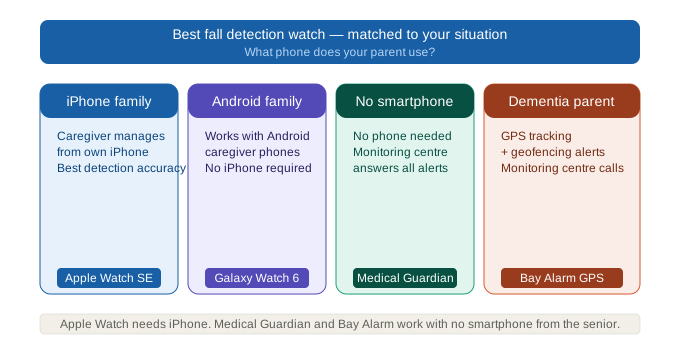
Mild dementia (early stage): Apple Watch SE with Family Setup. The caregiver manages all settings remotely. GPS location via Find My allows location checking without a separate tracker. The senior just wears the watch.
Moderate dementia: Medical Guardian Active. GPS tracking for wandering risk. Professional monitoring centre contacts the caregiver rather than dispatching 911 for every alert. Simple interface — one emergency button and auto-fall detection.
Advanced dementia (significant compliance uncertainty): No smartwatch is reliable. A parent with advanced dementia may remove the watch, forget to charge it, or not connect the button with getting help. At this stage, a room-based fall sensor (Vayyar) — which requires nothing to be worn — is the more appropriate technology.
The Conversation That Works
Before any of these devices protect your parent, your parent has to agree to wear it. Here is what consistently works — and what doesn’t.
What doesn’t work:
“You need this in case you fall.” (Implies they are expected to fall.)
“This is a medical alert device.” (Triggers identity resistance.)
“I’m worried about you all the time.” (May feel controlling.)
What works:
“Dad, I got you a watch. It tracks your steps and I can use it to check in on you so I don’t have to call every day. Give it a week.”
For the Apple Watch specifically: “It’s the same watch all the coaches are wearing now. It tells your heart rate too.”
For the Medical Guardian Active: “It’s a GPS watch — if you ever get stuck somewhere, it means you can call me directly from your wrist.”
The reframe: position it as a communication convenience for you, not a safety device for them.
Frequently Asked Questions
Q: What is the best fall detection watch for seniors?
A: There is no single best — it depends on your parent’s situation. Best for maximum safety (solo senior, no smartphone): Medical Guardian Active. Best value (iPhone family): Apple Watch SE. Best for nighttime (long battery): Lively Wearable2. Best for Android: Samsung Galaxy Watch. Use the three-question framework above to identify your specific best pick.
Q: Is the Apple Watch the best fall detection watch for seniors?
A: For iPhone families on a budget, yes — at $609 over three years it is the most cost-effective option. For seniors living alone without a smartphone, no — Medical Guardian Active’s professional monitoring centre is significantly more appropriate than Apple Watch’s 911-only response.
Q: Does a fall detection watch need a monthly subscription?
A: Depends on the device. Medical Guardian Active ($47.95/mo) and Lively Wearable2 ($14.99–$24.99/mo) are subscription-based. Apple Watch and Samsung Galaxy Watch require a $10/mo cellular plan add-on but no monitoring subscription. Garmin Venu has no monthly fee but requires a nearby phone.
Q: What is the best fall detection watch for a parent living alone?
A: Medical Guardian Active. A solo senior needs a professional monitoring centre that can speak with them through the watch, screen the situation, and dispatch appropriate help — not a watch that automatically calls 911 for every detected fall.
Q: How long does the battery last on fall detection watches?
A: Apple Watch SE: ~18 hours (charge nightly). Medical Guardian Active: ~24 hours (charge during day, can wear overnight). Samsung Galaxy Watch: ~2 days. Lively Wearable2: 3–5 days (best in category). Garmin Venu: 5–7 days.
Q: Can a fall detection watch replace a pendant?
A: Yes — and for most seniors, it does so more effectively, because wear rates are significantly higher for watches than pendants. The pendant that sits in a drawer protects no one.
Q: What is the best fall detection watch that can be worn to bed?
A: Lively Wearable2 — 3 to 5 day battery means your parent can wear it overnight every night without a daily charging routine. It is the only device in this category reliably suitable for overnight wear. Apple Watch (18h) and Medical Guardian Active (24h) can be worn overnight if charged during a daytime window, but require a deliberate routine change.
Q: What is the best fall detection watch for a parent with dementia?
A: Mild dementia: Apple Watch SE with Family Setup (caregiver-managed remotely). Moderate dementia: Medical Guardian Active (GPS for wandering, professional monitoring). Advanced dementia: No watch is reliable — consider a room-based sensor instead.
Q: What is the total cost of the best fall detection watch over 3 years?
A: Garmin Venu: $350. Apple Watch SE: $609. Samsung Galaxy Watch: ~$610. Lively Wearable2: ~$689. Medical Guardian Active: $1,726. The most expensive option costs $1,376 more than the cheapest over three years — a meaningful difference that should factor into the decision alongside safety requirements.
Q: Which fall detection watch has the most accurate fall detection?
A: Medical Guardian Active is the consensus leader for fall detection accuracy in the dedicated medical alert category, with CSAA Five Diamond certified monitoring response. Apple Watch’s fall detection is well-regarded among consumer devices and is the most extensively tested in real-world conditions. All devices produce some false alarms — approximately 15–25% of activations.
Q: What is the best fall detection watch that doesn’t require pressing a button?
A: Medical Guardian Active and Lively Wearable2 both include auto-fall detection that triggers without any button press. Apple Watch and Samsung Galaxy Watch also have automatic fall detection built in. All devices have a manual button as the primary trigger with auto-detection as the backup — or primary, for seniors who may not be able to press a button during an emergency.
Our Final Recommendation
For most seniors living alone: Medical Guardian Active is the best fall detection watch. Professional monitoring, GPS, no phone required, month-to-month. Medical Guardian
For iPhone families wanting the best value: Apple Watch SE at $609 over three years. Use Family Setup. Establish a daytime charging routine for overnight coverage. Apple Watch
For nighttime fall risk above all else: Lively Wearable2. Wear it to bed. Professional monitoring included. Simplest interface available. Lively
For Android households: Samsung Galaxy Watch. Same cost as Apple Watch, integrates with Android, 2-day battery. Samsung Galaxy Watch
Before you buy anything — check your parent’s Medicare Advantage plan for PERS device coverage. Some plans include medical alert devices at no additional cost. A five-minute call could make this decision significantly cheaper.
For scenario-matched picks across the smartwatch category, see our best smart watch for seniors with fall detection comparison. For caregivers whose priority is professional monitoring in a watch format, see our medical alert watch for seniors with fall detection guide.