A GPS tracker watch for seniors does two things a standard medical alert cannot: it tells you where your parent is right now, and it tells you when they fall.
In This Guide
- Overview
- Comparison
- Best Options
- Our Recommendation
The location tracking is what separates a tracker watch from a traditional medical alert pendant. With a GPS watch for seniors, you can open an app on your phone and see your parent on a map — whether they are at home, at the shops, or walking in the park. You do not need to wait for an emergency. You can check any time.
But not all GPS tracker watches for seniors work the same way. Some connect to a professional monitoring centre that calls you when something goes wrong. Others call 911 directly. Some require an iPhone. Some work completely standalone. The differences matter enormously — and this guide explains them clearly so you choose the right watch for your parent’s specific situation.
What Makes a Watch a GPS Tracker Watch? — GPS Tracker Watch For Seniors
A GPS tracker watch for seniors has these core features:
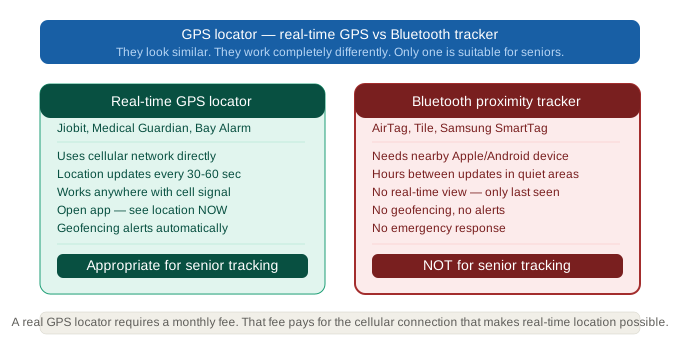
Real-time GPS: The watch uses cellular GPS to show the wearer’s location on a map, updated continuously. You can open the app right now and see exactly where your parent is.
Cellular connectivity: The watch connects to a cellular network directly — no Wi-Fi, no Bluetooth relay, no smartphone required by the senior. Location data reaches your phone regardless of where your parent is.
Caregiver app: You track your parent’s location on a smartphone app. Most apps also show location history, battery level, and alert history.
Geofencing: You draw a safe zone on the map — the home, a care facility, a regular walk route. If your parent moves outside that zone, the app sends you an automatic alert.
Emergency response: The watch connects to a monitoring centre (dedicated senior watches) or calls 911 (consumer smartwatches) when the emergency button is pressed or fall detection triggers.
Not all watches have all of these. The most important distinction is the emergency response type — monitoring centre versus 911 only — which determines how you are notified when something goes wrong.
Medical Guardian Smart Watch — Best GPS Tracker Watch with Monitoring Centre
Medical Guardian Smart Watch is the best GPS tracker watch for seniors who need professional monitoring combined with real-time location tracking.
When the GPS tracker watch detects a fall or the senior presses the emergency button, the call routes to a CSAA Five Diamond certified monitoring centre. An operator speaks with the senior through the watch speaker, assesses the situation, and calls the caregiver directly — before dispatching emergency services. This means you are informed and involved in the response, not notified after the fact.
Real-time GPS tracking is continuously available in the Medical Guardian app. Geofencing sends automatic alerts when your parent moves outside the designated zone. Multiple caregivers can access the app simultaneously.
The watch operates entirely via built-in cellular — no smartphone, no Wi-Fi required from your parent.
- Device: $60–$100
- Monthly: $44.95 (monitoring + GPS + cellular — all inclusive)
- GPS: Continuous, geofencing alerts
- Fall detection: Yes — monitoring centre response
- Monitoring centre: CSAA Five Diamond certified
- Battery: 24–48 hours
- No phone required
- Year 3 total: ~$1,678–$1,718
Best for: Seniors without a smartphone. Dementia or any wandering risk — geofencing is essential. Remote caregivers who need a monitoring centre to call them directly. Caregivers who want GPS tracking AND fall detection in one device.
Lively Jitterbug Smart3 — Best Value GPS Tracker Watch
Lively Jitterbug Smart3 combines GPS tracking, monitoring centre access, and basic smartphone functionality at a significantly lower monthly cost than Medical Guardian.
The Lively Link caregiver app provides real-time location. The Lively Urgent Response monitoring centre is available 24/7. The device also functions as a basic phone — your parent can make and receive calls directly from the watch.
At $19.99–$29.99/mo, Lively costs $180–$300 per year less than Medical Guardian — a saving of $540–$900 over three years while retaining professional monitoring and GPS tracking.
- Device: $75–$150
- Monthly: $19.99–$29.99
- GPS: Yes — Lively Link app
- Fall detection: Yes — Lively monitoring centre
- Monitoring centre: Yes — 24/7 Lively Urgent Response
- Battery: 1–2 days
- Year 3 total: ~$794–$1,229
Best for: Budget-conscious caregivers who need GPS tracking with professional monitoring. Seniors who want to make calls from the device. Families who want monitoring without Medical Guardian’s premium price.
Bay Alarm SOS Smart Watch — Best Budget GPS Tracker Watch
Bay Alarm SOS Smart Watch delivers GPS tracking and professional monitoring at the lowest monthly cost in the dedicated senior GPS tracker watch category.
- Device: $49–$79
- Monthly: $24.95
- GPS: Yes — caregiver portal
- Fall detection: Optional add-on
- Monitoring centre: Yes — Bay Alarm Medical
- Battery: ~24 hours
- Year 3 total: ~$948
Best for: Caregivers on the tightest budget who still need professional monitoring. Bay Alarm Medical’s established monitoring reputation at a lower price point.
Apple Watch SE — Best GPS Tracker Watch for Active Seniors with iPhone
Apple Watch SE is the best GPS tracker watch for seniors who are active, cognitively intact, and already use an iPhone.
The GPS tracker watch for seniors works via Find My — the caregiver can check the senior’s location on their iPhone at any time. Fall detection is built in — if a fall is detected and the senior does not respond, the watch calls 911 and sends a location alert to emergency contacts. Family Setup allows the caregiver to manage the watch entirely from their own iPhone.
At ~$609 over three years, Apple Watch SE costs $1,069–$1,109 less than Medical Guardian. For lower-risk seniors in iPhone households, this is a significant saving.
- Device: $249–$329
- Monthly: ~$10 (cellular plan add-on)
- GPS: Yes — Find My location sharing
- Fall detection: Yes — calls 911
- Monitoring centre: No — 911 only
- Requires: iPhone
- Battery: ~18 hours — charge nightly
- Year 3 total: ~$609–$689
Best for: Active seniors with an existing iPhone. Lower-risk seniors who need GPS tracking and basic fall detection. iPhone households where Family Setup is practical.
Not for: Dementia — no geofencing alerts, 911-only response, nightly charging required. For dementia-specific guidance see our full guide on GPS locator watch seniors dementia. Seniors without an iPhone.
GPS Tracker Watch vs Clip-On Tracker — Which Should You Choose?
By searching “GPS tracker watch for seniors,” you have already indicated a preference for wrist-worn tracking. But it is worth confirming the watch form factor is right for your parent before purchasing.
Choose a GPS tracker watch if:
- Your parent will wear a watch consistently and not remove it
- You need fall detection combined with GPS tracking
- Your parent is comfortable with a wrist-worn device
- You want a single device that covers both emergencies and location tracking
Choose a clip-on GPS tracker (Jiobit) instead if:
- Your parent resists or removes wrist-worn devices
- Overnight tracking is the primary concern — Jiobit’s 7–10 day battery avoids the nightly charging conflict
- Your parent has dementia and compliance is uncertain
- You need location tracking only — fall detection is not a priority
Both approaches can be combined: a GPS tracker watch for seniors for daytime emergencies and fall detection, paired with a Jiobit clip-on for overnight tracking when the watch is charging.
Setting Up Geofencing on a GPS Tracker Watch
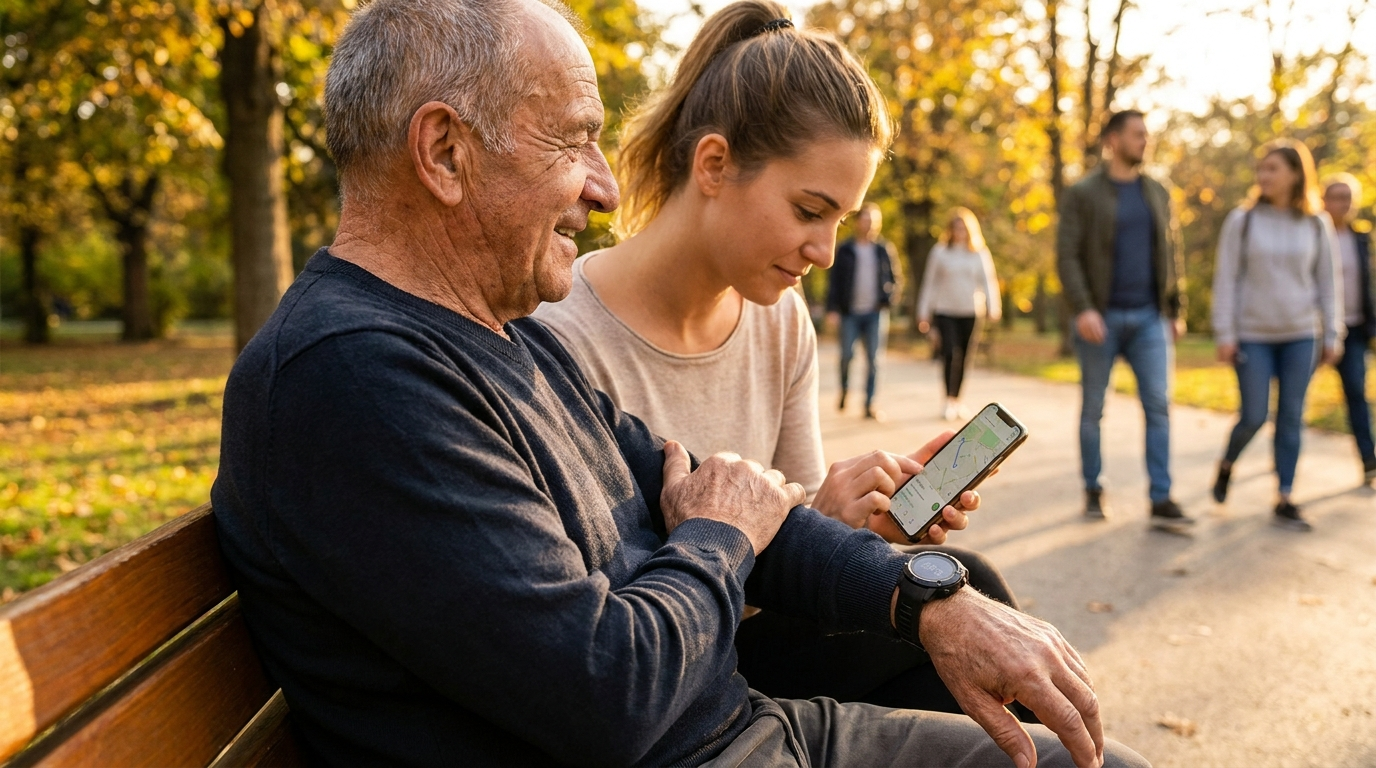
Geofencing is the feature that makes a GPS tracker watch genuinely useful for wandering prevention — and it takes less than five minutes to set up.
On Medical Guardian Smart Watch:
- Open the Medical Guardian caregiver app
- Select your parent’s device
- Go to Geofencing or Safe Zone settings
- Draw a circle or zone on the map around the home
- Set the alert recipient — your phone number
- Save — alerts will begin immediately
On Lively Jitterbug Smart3:
- Open the Lively Link app
- Select Zones or Location Alerts
- Set the home address as the primary safe zone
- Configure alert preferences
Once set up, you receive an automatic push notification the moment your parent crosses the boundary — no manual checking required.
Recommended geofencing boundaries:
- Home only: tight boundary around the property perimeter
- Neighbourhood: larger zone covering the regular walk route
- Care facility: boundary around the facility building
Start with the tightest boundary that makes sense for your parent’s routine. You can expand it as needed — but a tighter boundary gives earlier warning.
3-Year Cost Comparison — All GPS Tracker Watches
| Watch | Monthly | Year 3 Total | Monitoring | Geofencing | Phone Required |
|---|---|---|---|---|---|
| Apple Watch SE | $10 | ~$609 | 911 only | No | Yes (iPhone) |
| Bay Alarm SOS | $24.95 | ~$948 | Professional | Yes | No |
| Lively Jitterbug | $19.99–$29.99 | ~$794–$1,229 | Professional | Yes | No |
| Medical Guardian | $44.95 | ~$1,678–$1,718 | Professional | Yes | No |
The cost gap between Apple Watch ($609) and dedicated senior watches ($948–$1,718) exists because of professional monitoring and geofencing. If your parent needs a monitoring centre to call you directly when something goes wrong — the premium is justified. If 911 auto-dispatch is sufficient — Apple Watch is the most cost-effective GPS tracker watch available.
Frequently Asked Questions
Q: What is a GPS tracker watch for seniors?
A: A wrist-worn device with built-in cellular GPS that shows the wearer’s real-time location on a caregiver’s phone app, plus emergency response when a fall is detected or the button is pressed. Also called a GPS tracker for elderly — different from consumer smartwatches in that dedicated senior GPS tracker watches include professional monitoring centres and geofencing.
Q: What is the best GPS tracker watch for seniors with dementia?
A: Medical Guardian Smart Watch — geofencing alerts when your parent leaves home, professional monitoring centre that calls you directly, continuous GPS tracking, no smartphone required. Apple Watch is not appropriate for dementia — no geofencing, 911-only response. For a full dementia guide see our article on GPS locator watch seniors dementia.
Q: Does a GPS tracker watch track in real time?
A: Yes — dedicated senior GPS tracker watches (Medical Guardian, Lively, Bay Alarm SOS) and Apple Watch SE all provide real-time location visible on a caregiver app. Location updates every few seconds when active.
Q: How long does the battery last on a GPS tracker watch for seniors?
A: Apple Watch SE: ~18 hours. Bay Alarm SOS: ~24 hours. Medical Guardian: 24–48 hours. Lively: 1–2 days. All require regular charging — nightly for Apple Watch, every 1–2 days for dedicated senior watches.
Q: Does a GPS tracker watch for seniors need a monthly fee?
A: Apple Watch requires a $10/mo cellular plan add-on. Dedicated senior GPS tracker watches require $19.99–$44.95/mo covering monitoring, GPS, and cellular connectivity — all included in one fee.
Q: Does a GPS tracker watch for seniors watch need a smartphone?
A: Apple Watch requires an iPhone. Medical Guardian Smart Watch, Lively Jitterbug Smart3, and Bay Alarm SOS all operate completely independently via built-in cellular — no smartphone required from the senior.
Q: Can I set up a geofence so I get alerted when my parent leaves home?
A: Yes — Medical Guardian, Lively, and Bay Alarm SOS all include geofencing. Set a safe zone around the home on the app and receive an automatic alert when your parent crosses it. Apple Watch does not have caregiver geofencing. For a broader comparison see our guide to the best GPS watch for seniors.
Q: What is the best GPS tracker watch for seniors who do not have a smartphone?
A: Medical Guardian Smart Watch, Lively Jitterbug Smart3, or Bay Alarm SOS Smart Watch — all three operate with built-in cellular and require no smartphone from the senior. Apple Watch requires an iPhone and is not an option for seniors without one.
Q: What is the difference between a GPS tracker watch and a medical alert pendant for seniors?
A: A medical alert pendant provides emergency response — press the button, speak to a monitoring centre. A GPS tracker watch does this AND tracks real-time location — you can see where your parent is on a map at any time, set geofencing alerts, and track movement history. For a parent who stays at home, a pendant may be sufficient. For a parent who goes out alone or has wandering risk, GPS tracking is essential.
Q: Can a GPS tracker watch for seniors tell me if my parent has left the house without me checking the app?
A: Yes — via geofencing. Set a safe zone around the home on the Medical Guardian, Lively, or Bay Alarm app, and you receive an automatic push notification the moment your parent crosses the boundary. You do not need to actively monitor the app. For additional eldercare resources, the Eldercare Locator connects families with local support services across the US.
Our Final Recommendation
For caregivers who need GPS tracking, geofencing, and a monitoring centre that calls them directly: Medical Guardian Smart Watch.
For the best value GPS tracker watch with monitoring: Lively Jitterbug Smart3.
For the lowest-cost monitoring GPS tracker watch for seniors: Bay Alarm SOS Smart Watch.
For active seniors with an iPhone who are comfortable with 911 emergency response: Apple Watch SE.
For seniors who resist wrist-worn devices or need overnight tracking without daily charging: Jiobit clip-on.