If your parent’s doctor recommended Philips Lifeline, there is something you should know first: Philips no longer owns it.
In 2021, Royal Philips sold the Lifeline medical alert business to Connect America, one of North America’s largest connected health platforms. The product is now marketed simply as Philips Lifeline — the Philips name has been dropped.
This matters for two reasons. First, families who trust the Philips brand may not realise they are now buying a Connect America product. Second, the hospital and physician recommendation network that built Lifeline’s reputation over decades remains intact — doctors still recommend it at discharge, even though the company behind it has changed hands.
Whether those recommendations are still justified in 2026 is what this review addresses.
The First Thing to Know — Philips No Longer Owns Lifeline
Philips Lifeline was founded in 1974 — making it one of the oldest personal emergency response companies in the world. Royal Philips acquired it in 2006 and built its reputation through clinical partnerships and hospital discharge programmes. In 2021, Philips sold the business to Connect America as part of a broader divestiture of healthcare assets.
Connect America continues to operate Philips Lifeline under the same brand name but without the Philips parent company behind it. The monitoring infrastructure, clinical protocols, and hospital relationships have been maintained. For most customers, the transition was invisible.
Why do doctors still recommend it? Hospital discharge coordinators and occupational therapists often have longstanding relationships with Lifeline sales representatives built over years. Recommendations are slow to change in clinical settings, and Lifeline has actively maintained those relationships post-acquisition.
That institutional credibility is Philips Lifeline’s most valuable asset in 2026 — more than its technology or its pricing.
Philips Lifeline Systems Available in 2026
Lifeline offers three main systems. The product line has not changed significantly since the Connect America acquisition.
HomeSafe Landline — $29.95 per month (annual billing)
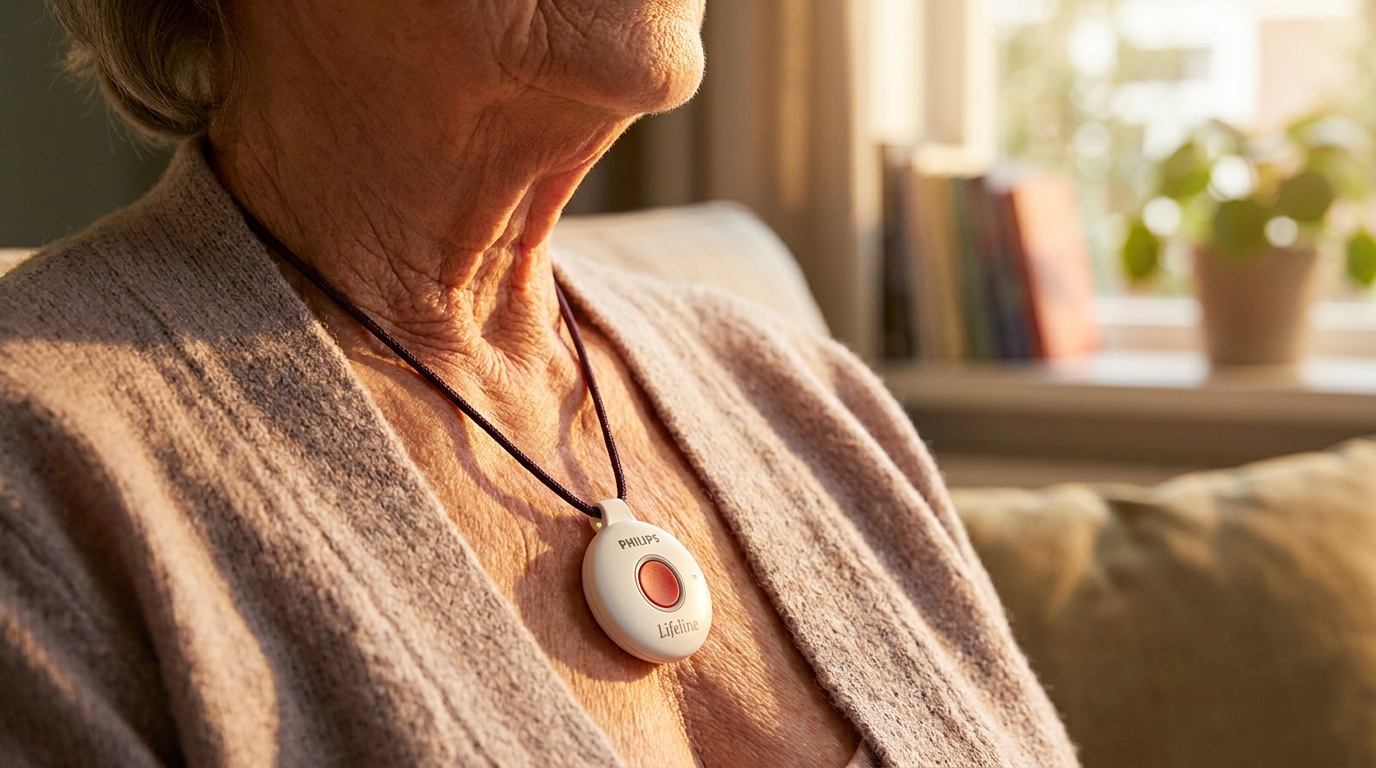
The HomeSafe landline system is Lifeline’s most affordable option. It includes a base station that connects to your home telephone line and a waterproof wearable help button available as a pendant or wristband.
When the button is pressed, the call connects through the base station speaker to Lifeline’s monitoring centre. The monitoring centre is staffed 24/7 by approximately 200 trained care specialists, each with training in geriatrics, safety, and stress management. Lifeline’s monitoring centres are HIPAA compliant.
On monthly billing, the HomeSafe landline is $34.95 per month. The annual plan at $29.95 per month saves $60 per year and includes free shipping and a free lockbox.
HomeSafe Cellular — from $34.95 per month (annual billing)
The cellular version of HomeSafe operates on AT&T’s cellular network, eliminating the need for a landline. Features and range are equivalent to the landline version. On monthly billing this rises to $39.95 per month.
The cellular option is appropriate for seniors who no longer have a landline — increasingly the majority of households — or who want the reliability of cellular backup.
On the Go — Mobile GPS System
Lifeline’s mobile system works outside the home using GPS and cellular connectivity. The pendant connects directly to the monitoring centre without needing a home base station. Pricing starts higher than the HomeSafe systems.
⚠️ Note: Current On the Go pricing was not confirmed across all sources at time of writing. Check lifeline.com directly for the most current mobile plan pricing before purchasing.
Philips Lifeline Smartwatch — $39.95 per month plus $159 device fee
Lifeline offers a smartwatch option for seniors who prefer a wrist-worn device to a pendant. The smartwatch plan is $39.95 per month with a one-time $159 device purchase fee. Unlike the HomeSafe systems, the smartwatch does not carry the $99.95 activation fee.
The My Lifeline app is included free with every system. It allows caregivers to contact support, test the system, check battery status, update emergency contacts, manage the care plan, and share notes with other family members. Multiple users can be managed under one account — useful for families monitoring both parents simultaneously.
Lifeline Pricing — All Costs Explained
Lifeline’s pricing is transparent on its website, but the full picture requires adding several components together.
The HomeSafe landline plan costs $29.95 per month on annual billing. On monthly billing it is $34.95 per month.
The $99.95 activation fee applies to every Philips Lifeline system except the smartwatch. This is one of the higher activation fees in the category — Bay Alarm Medical and LifeFone charge nothing upfront, and Medical Guardian also waives equipment fees. The $99.95 is worth factoring into first-year cost calculations.
Shipping is $29.95 unless you choose an annual plan, which includes free shipping.
Fall detection is an additional $15 per month — higher than the $10 per month charged by both Medical Guardian and Bay Alarm Medical for the same feature. This is a meaningful price difference for families who want fall detection. Over a year, the $5 gap adds up to $60.
Professional installation can be added for $99. This is optional — most Philips Lifeline systems are designed for self-installation — but available for seniors or families who prefer a technician to handle setup.
A lockbox is available for $2.95 per month if not included in the plan.
First-year total on the HomeSafe cellular monthly plan with fall detection and standard shipping: $34.95 multiplied by 12 months equals $419.40, plus $99.95 activation, plus $15 per month fall detection multiplied by 12 months equals $180, plus $29.95 shipping. Approximately $729 in year one.
LifeFone comparison over the same year with fall detection: $24.95 per month base plus $5/mo fall detection add-on, no activation fee, free shipping on annual plan. Significantly lower first-year cost.
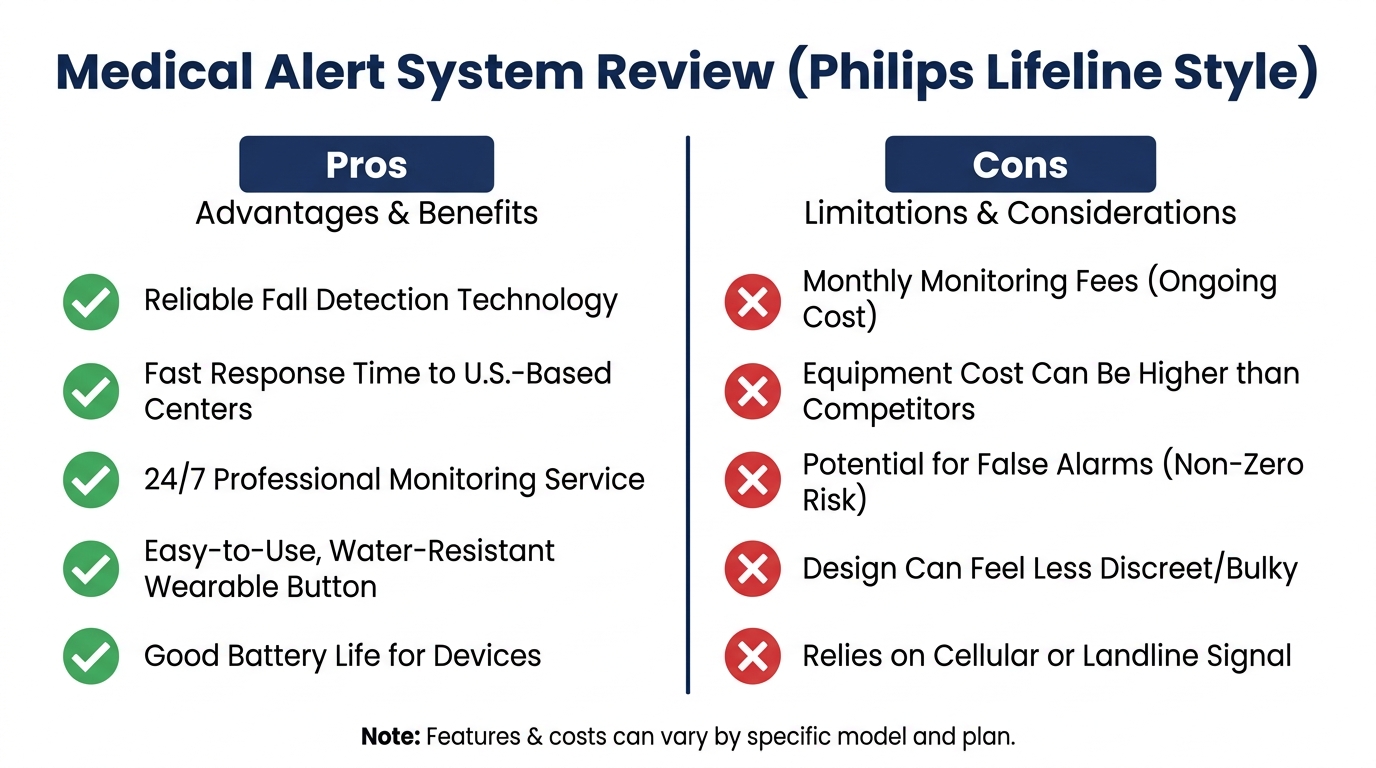
What We Like About Philips Lifeline
12-Second Average Response Time
Lifeline’s monitoring centre averaged 12 seconds to answer test calls in independent assessment — significantly faster than Life Alert’s 120 seconds, and close to Medical Guardian’s 8-second average. For a system recommended at hospital discharge, this response time is clinically appropriate.
No Long-Term Contract — Cancel Anytime
Philips Lifeline operates without a long-term contract. You can cancel at any time by returning the equipment. This is a significant improvement over Life Alert’s 36-month mandatory contract, and it is the standard the industry has moved toward.
Hospital and Clinical Credibility
No other medical alert brand has Lifeline’s depth of clinical relationships. If your parent’s discharge coordinator recommended Philips Lifeline, that recommendation carries weight that a consumer review cannot fully replicate. The product has been in clinical use since 1974. The monitoring protocols are well-established.
My Lifeline App — Free With Every System
The My Lifeline app is functional and well-reviewed compared to Medical Guardian’s MyGuardian app. Caregivers can monitor devices, update contacts, and manage care plans. Multiple users can be tracked under one account.
HIPAA-Compliant Monitoring
Lifeline’s monitoring operations comply with HIPAA standards, which matters for families who want to know that health information shared during an emergency call is handled appropriately.
What We Do Not Like
Fall Detection Costs $15 Per Month — $5 More Than Competitors
This is Lifeline’s most glaring pricing weakness. Fall detection is available but costs $15 per month — $5 more than Medical Guardian and Bay Alarm Medical ($10 each) for comparable fall detection capability. Over a year, that gap adds up to $60 extra. For a feature that has become table stakes in this category, the premium is difficult to justify.
$99.95 Activation Fee on Most Devices
Every Lifeline system except the smartwatch carries a $99.95 activation fee. Most major competitors — including LifeFone, Bay Alarm Medical, and Medical Guardian — waive equipment and activation fees entirely. This upfront cost raises the first-year total significantly and is worth factoring into any direct comparison.
Limited Device Range
Lifeline’s HomeSafe range was not independently confirmed to match Medical Guardian’s 1,400-foot cellular range. For seniors in larger homes, Medical Guardian’s wider coverage is an advantage.
Fewer Optional Add-Ons
Lifeline’s accessory and add-on catalogue is thinner than Medical Guardian’s. Options include the lockbox and fall detection, but the product line lacks the breadth that Medical Guardian offers across five devices and multiple accessories.
Lifeline vs Medical Guardian — Which Is Better?
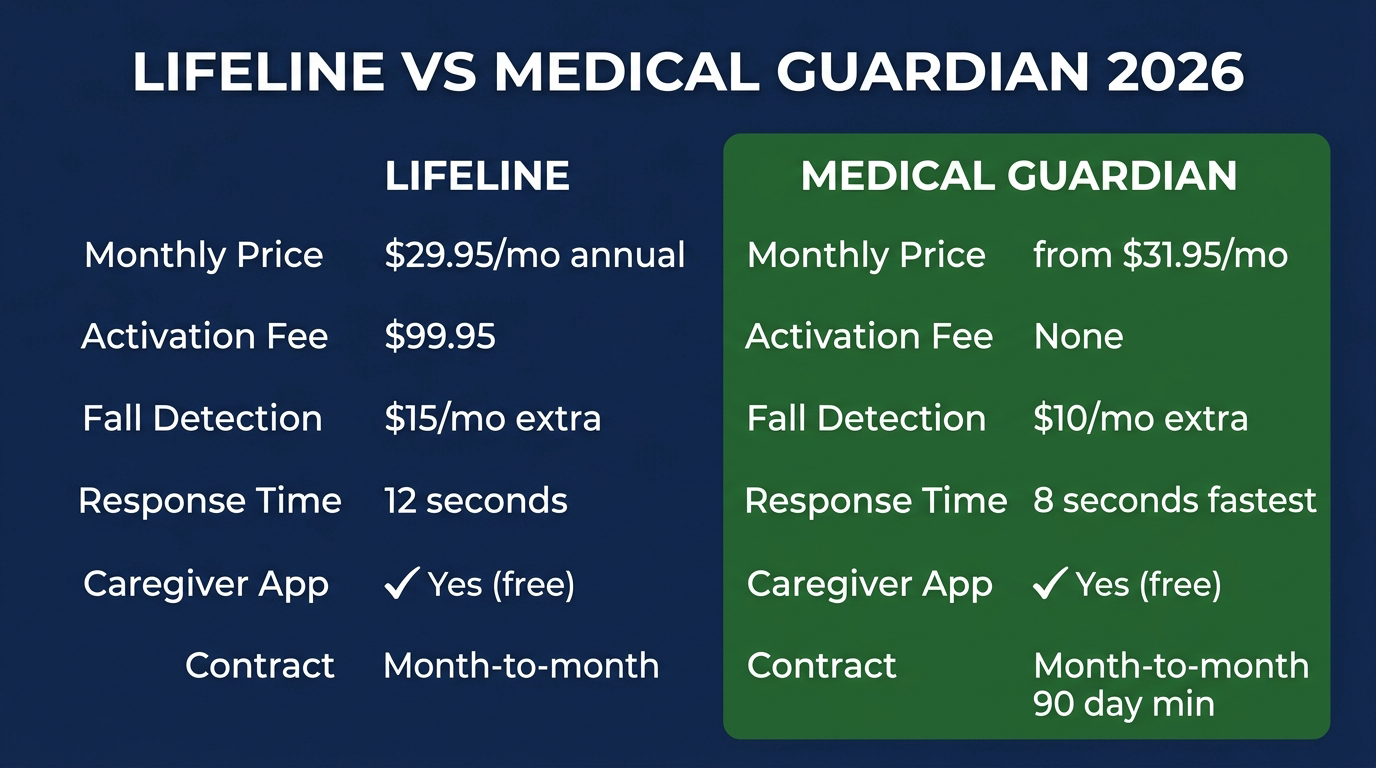
Monthly price: Lifeline HomeSafe cellular $34.95 vs Medical Guardian MGHome Cellular $36.95. Lifeline wins by $2/month.
Activation fee: Lifeline $99.95 vs Medical Guardian $0. Medical Guardian wins.
Fall detection: Lifeline $15/mo vs Medical Guardian $10/mo. Medical Guardian wins.
Response time: Lifeline 12 seconds vs Medical Guardian 8 seconds. Medical Guardian wins.
Clinical credibility: Lifeline wins — hospital discharge recommendation advantage.
Caregiver app quality: Medical Guardian MyGuardian has reported issues. Lifeline My Lifeline app better-reviewed. Lifeline wins.
Contract: Both month-to-month. Tie.
For most families making a feature-by-feature comparison, Medical Guardian is the stronger technical choice. For families who received a specific Lifeline recommendation from a physician or hospital and want to honour that recommendation, Lifeline is a defensible choice.
For our full Medical Guardian assessment, see our Medical Guardian review.
Is Philips Lifeline Worth It in 2026?
For families who received a Lifeline recommendation from a hospital or physician — yes, it remains a defensible choice. The monitoring quality is solid, the response time is clinically appropriate, and the brand has earned its clinical trust over five decades.
For families making a purely consumer-driven decision, Medical Guardian and Bay Alarm Medical offer faster response at competitive pricing, and LifeFone offers substantially lower cost for equivalent core monitoring.
The $99.95 activation fee and $15 fall detection add-on are the two reasons to pause before committing to Lifeline if you were not specifically recommended it by a clinician.
Best Alternative if Lifeline Is Too Expensive
LifeFone at LifeFone starts at $24.95 per month on an annual plan ($29.95/mo month-to-month) — saving $120 per year versus Lifeline’s HomeSafe Cellular plan — with no activation fee, no equipment fee, no contract, fall detection from $5/mo, and a 30-day money-back guarantee.
For our full comparison of in-home medical alert options, see our in-home medical alert system guide and our full medical alert comparison.
Frequently Asked Questions
Is Philips Lifeline still in business in 2026?
Yes — but it is no longer owned by Philips. In 2021, Royal Philips sold the Lifeline business to Connect America. The product continues to operate under the Lifeline brand name without the Philips parent company.
Who owns Lifeline medical alert now?
Connect America, one of North America’s largest connected health platforms, acquired Lifeline from Philips in 2021 and continues to operate it today.
How much does Philips Lifeline cost per month?
The HomeSafe landline plan starts at $29.95 per month on annual billing or $34.95 per month on monthly billing. A $99.95 activation fee applies to most systems. Fall detection is an additional $15 per month.
Does Philips Lifeline have fall detection?
Yes — as an add-on for $15 per month. This is $5 more per month than the $10 fall detection add-ons at both Medical Guardian and Bay Alarm Medical.
Does Philips Lifeline require a contract?
No. Lifeline operates month-to-month. You can cancel at any time by returning the equipment.
What is the difference between HomeSafe and On the Go?
HomeSafe is Lifeline’s in-home system, using a base station and wearable help button. On the Go is Lifeline’s mobile system, which works outside the home using GPS and cellular connectivity without requiring a base station.
—
This article was researched and written by the SafeElderCare editorial team. Ownership and pricing information reflects publicly available data as of June 2026. Affiliate links are marked. SafeElderCare earns a commission if you purchase through our links at no extra cost to you.